

Do you ever find yourself constantly adjusting the thermostat in your home to achieve the perfect temperature? Imagine having a smart thermostat that learns your preferences and adjusts itself automatically. Picture coming back to a cozy home without lifting a finger.
In today’s fast-paced world, convenience is key. This article will guide you through the process of creating your very own smart thermostat, putting you in control of your home’s climate with just a few simple steps. Say goodbye to the hassle of manual adjustments and hello to a more comfortable living space tailored to your needs. Let’s dive in and unlock the potential of smart technology to enhance your daily life.
Key Takeaways
- Smart thermostats operate using sensors to monitor and adjust temperature settings automatically.
- Learning algorithms in smart thermostats analyze user preferences over time for optimal comfort and energy efficiency.
- Remote accessibility allows users to control their home’s climate from anywhere via mobile apps or web interfaces.
- Integration with other smart home devices enables a cohesive ecosystem for enhanced automation.
- Smart thermostats provide energy efficiency insights and geofencing capabilities for personalized settings based on location.
- Building a smart thermostat requires components like a microcontroller, sensors, connectivity modules, and coding for functionality and user interface design.
Understanding Smart Thermostats
To create a smart thermostat that meets your needs, it’s crucial to understand how they work.
Recommended Products

PRIVACY PROTECTION*: Sensi won’t sell your personal information to third parties

High use of the scheduling feature of the T5 thermostat saved customers between 8 and 16% on heating and cooling bills. Dollar savings range based on nationwide average annual single-family detached home's heat and cooling bills; actual savings varies based on consumption.

COMFORT COMES IN YOUR COLOR. Personalize your Wi-Fi Smart Color Programmable Thermostat to fit your décor.
How Smart Thermostats Operate
Smart thermostats operate by utilizing sensors to monitor your home’s temperature. These sensors collect data to determine when to adjust the heating or cooling settings automatically.
Learning Algorithms
Smart thermostats employ learning algorithms that analyze your temperature preferences over time. By recognizing patterns in your behavior, they adapt to your schedule, ensuring optimal comfort while maximizing energy efficiency.
Remote Accessibility
One key feature of smart thermostats is their remote accessibility. This means you can control your home’s climate from anywhere using a mobile app or a web interface.
Integration with Smart Home Systems
Smart thermostats can integrate with other smart home devices, creating a cohesive ecosystem. For instance, they can communicate with smart lights or voice assistants to enhance your overall home automation experience.
Energy Efficiency Insights
Another benefit of smart thermostats is their ability to provide insights into your energy consumption. They can offer data on when energy is being used most and suggest ways to optimize usage, potentially saving you money on utility bills.
Geofencing Capabilities
Geofencing is a feature that allows smart thermostats to adjust settings based on your location. When you’re away, the thermostat can automatically set your home to an energy-saving mode and readjust when you’re on your way back.
Understanding these aspects of smart thermostats is essential when creating your own. By grasping how they function and their benefits, you can design a system that perfectly caters to your lifestyle and preferences.
Components Required for Building a Smart Thermostat
To create your own smart thermostat system tailored to your lifestyle and preferences, you’ll need a few essential components. Here’s a list of what you’ll require to build a functional smart thermostat:
- Microcontroller: The brain of your smart thermostat, a microcontroller like Arduino or Raspberry Pi, manages the device’s operations and interfaces with sensors and actuators.
- Temperature Sensor: A key component that measures ambient temperature accurately to enable your thermostat to regulate the heating and cooling systems effectively.
- Humidity Sensor: This sensor helps in monitoring the humidity levels in your home, allowing your smart thermostat to adjust settings for optimal comfort.
- Display: An interface to show the current temperature, settings, and other relevant information for easy monitoring and control.
- Connectivity Module: Wi-Fi or Bluetooth connectivity enables remote access to your thermostat through mobile apps or web interfaces for convenient control from anywhere.
- Power Supply: Ensure a stable power source to keep your smart thermostat functioning reliably. You can use a USB power adapter or batteries based on your setup.
- Relay Module: Used to control heating, cooling, or fan systems based on the temperature readings and user settings.
- Real-Time Clock (RTC) Module: Provides accurate time data for scheduling operations, such as adjusting the temperature based on your daily routine.
- Enclosure: A protective case that houses all the components while ensuring safety and a neat appearance for your smart thermostat system.
By gathering these components and configuring them correctly, you can start building your personalized smart thermostat that offers convenience, energy efficiency, and a comfortable home environment. Remember to follow recommended guidelines and safety precautions during the assembly process to ensure a functional and reliable smart thermostat system.
Recommended Products

Voice Control & Remote Control: You can use Tuya Smart/Smart Life APP on Android and iOS to turn on/off electronic devices from anywhere. This WiFi switch works with Alexa/Google Assistant, you can use voice control to turn on/off home appliances.

Wi-Fi & Bluetooth-operated smart relay switch with 1 channel, up to 10A. The device is equipped with potential-free outputs (dry contacts), providing high flexibility in voltage support and various applications. It can be used to control a wide range of home appliances, electrical circuits, and office equipment individually.
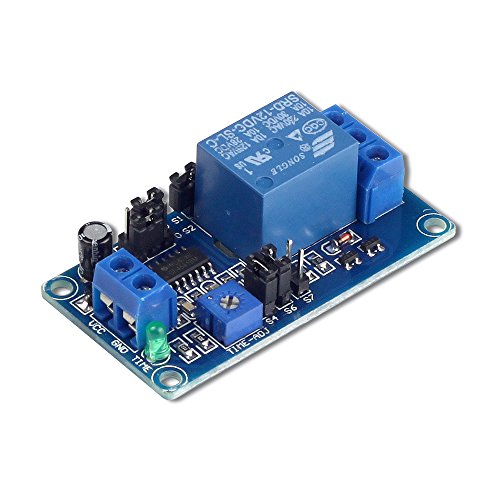
IMPORTANT NOTE: Please remove the jumper cap of S5 when controlling AC current or DC current voltages other than 12V, otherwise the module will be burned or will not work properly.
Coding the Smart Thermostat Functionality
When it comes to coding the functionality of your smart thermostat, you’ll need to consider a few key aspects to ensure it operates seamlessly. Below are the essential steps to help you implement the smart features successfully:
Initializing the Microcontroller
To kickstart the coding process, ensure that you correctly initialize the microcontroller you’re using for your smart thermostat. This step is crucial as it forms the foundation for the device’s operations. You can refer to the specific datasheet of your microcontroller for guidance on the initialization process.
Reading Sensor Data
To enable your smart thermostat to accurately regulate temperature, you’ll need to integrate code that reads data from the temperature and humidity sensors. By accessing this information, the thermostat can make informed decisions on adjusting the climate settings to align with your preferences.
Implementing Control Algorithms
Incorporate control algorithms into your code to dictate how the smart thermostat responds to sensor data. These algorithms are vital for determining when to activate heating or cooling mechanisms based on the environmental conditions detected by the sensors.
Setting Up Connectivity
Integrate the necessary code to establish connectivity for your smart thermostat. Whether it’s through Wi-Fi, Bluetooth, or another communication protocol, ensuring a stable connection is essential for remote access and control of the device.
Developing User Interface
To enhance user interaction, create a user interface on the thermostat’s display. This interface allows you to visualize temperature settings, mode selections, and other relevant information. Design a user-friendly interface that simplifies the operation of your smart thermostat.
Incorporating Energy-Saving Features
Optimize your code to include energy-saving features that enhance the efficiency of your smart thermostat. Implementing features such as scheduling temperature adjustments, adapting to occupancy patterns, and providing energy consumption data can contribute to a more sustainable and cost-effective heating and cooling system.
Designing the User Interface
When developing your smart thermostat, designing the user interface is key to ensuring a seamless and intuitive interaction for users. Here are some essential aspects to consider:
Incorporate User-Friendly Controls
Ensure that your smart thermostat’s interface features user-friendly controls that are easy to navigate. Utilize clear icons and symbols for temperature settings, modes, and other functions to enhance usability.
Implement Intuitive Navigation
Design an intuitive navigation flow that allows users to adjust settings effortlessly. Arrange menu options logically and provide visual cues for easy navigation within the interface.
Offer Customization Options
Provide users with customization options to personalize their experience. Allow for setting preferences such as display themes, scheduling options, and temperature units, enhancing user engagement with the thermostat.
Display Essential Information Clearly
Display critical information such as current temperature, set temperature, and mode prominently on the interface. Use contrasting colors and fonts to ensure visibility and readability in varying lighting conditions.
Enable Remote Access
Incorporate remote access capabilities into the user interface, allowing users to control the thermostat remotely via a mobile app or web portal. Provide secure login options and intuitive controls for seamless remote operation.
Integrate Energy-Saving Features
Include energy-saving features in the interface, such as scheduling modes, eco-friendly settings, and energy usage insights. Empower users to make informed decisions to optimize energy efficiency and reduce utility costs.
Ensure Responsive Design
Design the user interface with responsive layout principles to ensure compatibility across different devices and screen sizes. Optimize the interface for a consistent user experience on smartphones, tablets, and computers.
By focusing on these key elements when designing the user interface for your smart thermostat, you can create a user-friendly and functional system that enhances user comfort and energy efficiency.
Testing and Troubleshooting
When it comes to testing your smart thermostat after assembling it, there are several steps you can follow to ensure everything works as intended. Here’s how you can test and troubleshoot your smart thermostat:
Recommended Products

PROFESSIONAL HVAC DIAGNOSTIC TOOL Quickly bypass thermostat connections to identify issues in heating, cooling, or fan systems. Perfect for troubleshooting without dismantling complex setups - saves time and service call costs.

Save up to 26% per year on heating and cooling costs. ENERGY STAR certified. Included SmartSensor (50 dollar value) prompts your thermostat to make temperature adjustments ensuring comfort. Compared to a hold of 72°F/22°C

Remote Access and Control
Testing the Functionality
To check the basic functionality of your smart thermostat, start by powering it on and observing if the display activates correctly. Once powered up, test the temperature sensors by placing them in different environments and verifying if the readings on the display are accurate. You can also check the connectivity features by attempting to connect your smart thermostat to a compatible device or network.
Verifying Control Algorithms
After testing the sensors, it’s essential to verify the control algorithms of your smart thermostat. Adjust the temperature settings manually and observe if the thermostat responds accordingly. You can also set up automated schedules to check if the thermostat adjusts temperatures based on the programmed times.
Troubleshooting Common Issues
If you encounter any issues during testing, the following troubleshooting tips can help:
- Check Power Supply: Ensure the power source is stable and connected properly.
- Sensor Calibration: Calibrate sensors if the temperature readings seem inaccurate.
- Software Updates: Update the firmware of your smart thermostat to address any software-related issues.
- Network Connectivity: Troubleshoot network connectivity problems by checking Wi-Fi settings and signal strength.
- User Interface: Verify if the user interface is intuitive and responsive to inputs.
Testing Energy-Saving Features
To validate the energy-saving capabilities of your smart thermostat, monitor its energy consumption over a period. Compare the energy usage data with a traditional thermostat to assess the efficiency of your smart thermostat in optimizing energy consumption.
Remote Access Testing
Test the remote access functionality of your smart thermostat by connecting to it from a different location using a mobile app or a web interface. Check if you can adjust settings and monitor temperature remotely to ensure that the remote access feature functions smoothly.
By following these testing and troubleshooting steps, you can ensure that your smart thermostat operates efficiently, providing you with comfort, convenience, and energy savings.
Conclusion
You’ve now completed the journey of creating your very own smart thermostat system. By understanding the components, coding the functionality, and testing the system, you’ve equipped yourself with the knowledge to enjoy a comfortable, energy-efficient home. Remember, with a smart thermostat, you can effortlessly control your home’s temperature and save on energy costs. Keep exploring new ways to enhance your smart thermostat system and make the most out of its features. Enjoy the convenience and efficiency that a smart thermostat brings to your daily life.
Frequently Asked Questions
What are the advantages of using a smart thermostat?
Smart thermostats offer convenience by automatically adjusting temperature settings based on user behavior and preferences. They can help save energy and money by optimizing heating and cooling schedules.
What components are essential to build a personalized smart thermostat system?
You’ll need sensors to monitor temperature, humidity, and occupancy, microcontrollers to process data and control system operations, and connectivity modules for network communication.
What steps are involved in coding the functionality of a smart thermostat?
Coding a smart thermostat involves initializing the microcontroller, reading sensor data, implementing control algorithms for temperature regulation, setting up network connectivity, creating a user interface, and integrating energy-saving features.
How can I test and troubleshoot my smart thermostat system?
To test and troubleshoot your smart thermostat, ensure all components are functioning correctly, verify control algorithms are working as expected, address common issues like connectivity problems, test energy-saving features, and validate remote access capabilities.
