

Ever wondered how you can effortlessly transform your garden into a lush oasis while conserving water? Picture this: you’re juggling a hectic schedule, and the last thing you need is to worry about watering your plants efficiently. What if there was a smart solution that could handle all your watering needs with just a few taps on your phone?
Key Takeaways
- B-hyve Smart Watering system uses smart technology to analyze local weather data and plant requirements for efficient watering.
- The system allows for remote access and customization of watering settings to suit specific plant types and soil conditions.
- Dividing your garden into zones and receiving detailed watering reports can help optimize water usage and monitor system performance.
- Setting up the B-hyve controller involves steps like installing the app, adding zones, configuring schedules, enabling remote access, and utilizing watering reports.
- Programming a personalized watering schedule with custom zones, smart control features, remote access, and detailed watering reports contributes to healthy plant growth and water conservation.
- Troubleshooting common programming issues like inaccurate zone settings, connectivity problems, incorrect weather adjustments, remote access troubles, and irrigation schedule errors ensures smooth operation of the system.
Understanding the B-hyve Smart Watering System
To understand how the B-hyve Smart Watering system operates, consider the following key points:
- Smart Control: The B-hyve system uses smart technology to analyze local weather data and plant requirements.
- Efficient Watering: It ensures efficient water usage by adjusting watering schedules based on environmental conditions.
- Remote Access: You can manage the watering system remotely through a smartphone app.
- Customization: Tailor watering settings to suit specific plant types and soil conditions.
- Watering Zones: Divide your garden into zones to provide precise watering where needed.
- Watering Reports: Receive detailed reports on water usage and system performance for better monitoring.
By grasping these essential aspects of the B-hyve Smart Watering system, you can optimize water usage and achieve a healthy, flourishing garden effortlessly.
Setting Up the B-hyve Controller
To set up your B-hyve controller for efficient watering, follow these straightforward steps:
- Installing the B-hyve Controller
- Begin by downloading the B-hyve app on your smartphone.
- Create an account or log in if you already have one.
- Follow the app instructions to connect your controller to your Wi-Fi network.
- Adding Zones for Customized Watering
- Identify the zones in your garden based on plant type, sunlight exposure, and soil type.
- Input these zones into the app and assign them specific names for easy identification.
- Configuring Schedule and Watering Adjustments
- Set up a watering schedule that aligns with the watering needs of each zone.
- Utilize the smart features of the app to adjust watering based on local weather forecasts.
- Enabling Remote Access
- Enjoy the convenience of controlling your watering system from anywhere using the B-hyve app.
- Make real-time adjustments to watering schedules or manually start watering sessions as needed.
- Utilizing Watering Reports
- Take advantage of the detailed watering reports provided by the app.
- Monitor water usage, track watering history, and optimize your watering schedule for efficiency.
By following these steps, you can seamlessly set up your B-hyve controller to create a customized and water-efficient watering system for your garden. Enjoy a thriving garden while conserving water with this smart solution.
Recommended Products


Intelligent Irrigation Control: The Orbit Smart Sprinkler Controller manages watering with a powerful smart sprinkler that supports a completely automatic watering system

Smart Irrigation Control Anywhere: The Orbit B-hyve Indoor Smart Sprinkler Controller provides smart sprinkler timer functionality for efficient yard irrigation
Programming the B-hyve Smart Watering Schedule
When it comes to programming the B-hyve Smart Watering schedule, you have the power to customize and optimize your watering routines for your garden’s specific needs. Follow these straightforward steps to set up an efficient watering schedule that will help your plants thrive while conserving water.
Recommended Products

Advanced Smart Irrigation Control: The Orbit B-hyve XR Smart Sprinkler Timer manages underground watering with a powerful smart sprinkler timer system featuring WiFi-enabled connectivity

DITCH THE DIAL – Upgrade to smart irrigation with the free Rachio app for precise, easy control.

Indoor WiFi sprinkler timer puts control of your sprinkler system in the palm of your hand with intuitive Rain Bird mobile app
Creating Custom Zones
To begin, access the B-hyve app on your smartphone and add customized zones based on the specific requirements of different areas in your garden. For example, you can create separate zones for your lawn, flower beds, and garden plants. Assigning unique settings to each zone ensures that every area receives the right amount of water.
Configuring Watering Schedules
Once you’ve set up your custom zones, it’s time to configure your watering schedules. With the B-hyve Smart Watering system, you can input the desired watering frequency, duration, and time for each zone. This level of customization allows you to create a tailored schedule that aligns with your plants’ watering needs.
Utilizing Smart Control Features
Take advantage of the B-hyve system’s smart control capabilities that adjust your watering schedule based on local weather data. By incorporating real-time weather information, the system can adapt the watering frequency and duration to account for rainfall, humidity, and temperature changes, ensuring optimal water usage.
Remote Access and Monitoring
With the B-hyve app, you have the convenience of monitoring and controlling your watering schedule from anywhere. Whether you’re at home, work, or on vacation, you can easily access the app to make adjustments, check watering reports, or pause watering if needed. This remote access feature adds a layer of flexibility to your gardening routine.
Reviewing Detailed Watering Reports
Stay informed about your garden’s watering habits by reviewing the detailed watering reports provided by the B-hyve system. These reports offer insights into watering history, usage trends, and watering efficiency. By analyzing this data, you can make informed decisions to further optimize your watering schedule for better plant health.
By following these steps and leveraging the features of the B-hyve Smart Watering system, you can program a personalized watering schedule that caters to your garden’s unique requirements, promoting healthy growth and water conservation.
Troubleshooting Common Programming Issues
If you encounter any difficulties while programming your B-hyve Smart Watering system, here are some common issues you might face along with their solutions:
Inaccurate Zone Settings
- Check that you have set up each watering zone correctly, including the specific plant or garden area that corresponds to it.
- Ensure that the watering duration and frequency are appropriate for the type of vegetation in each zone.
Connectivity Problems
- Make sure your B-hyve hub is connected to a stable Wi-Fi network with a strong signal.
- Verify that the app is up-to-date and try restarting both the hub and your router if connection issues persist.
Incorrect Weather Adjustments
- Confirm that the system is receiving accurate local weather data for precise watering adjustments.
- Check the settings to ensure the weather adjustments are calibrated correctly based on your garden’s needs.
Remote Access Troubles
- If you’re unable to access the system remotely, double-check your app permissions and ensure you’re logged in with the correct credentials.
- Restart the app or log out and back in to troubleshoot any connectivity issues.
Irrigation Schedule Errors
- Review your programmed watering schedule to make sure it aligns with your garden’s requirements.
- Adjust the watering frequency and duration as needed to prevent over or under-watering.
- Inspect the soil moisture and weather sensors for any damage or interference that may affect their functionality.
- Replace the batteries or recalibrate the sensors according to the manufacturer’s instructions.
By addressing these common programming issues proactively, you can ensure that your B-hyve Smart Watering system operates smoothly and effectively, allowing you to maintain a healthy and water-efficient garden hassle-free.
Fine-tuning Watering Settings for Optimal Performance
Refine your watering settings to maximize the efficiency and efficacy of your B-hyve Smart Watering System. Fine-tuning these settings ensures that your garden receives the right amount of water at the right time, promoting healthy plant growth while conserving water.
Recommended Products
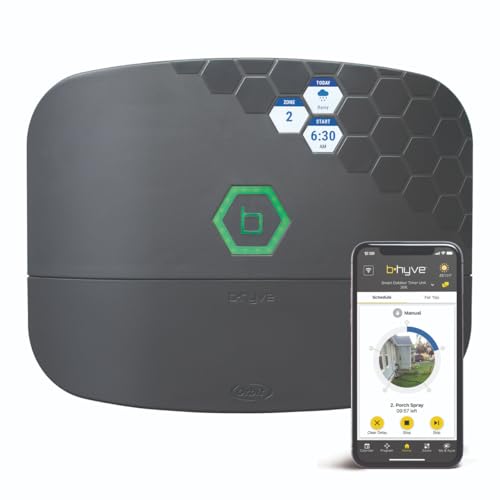
Advanced Smart Irrigation Control: The Orbit B-hyve XR Smart Sprinkler Timer manages underground watering with a powerful smart sprinkler timer system featuring WiFi-enabled connectivity

ADVANCED WATER LEAK DETECTION DEVICE - Our water leak detectors for homes provide reliable protection against potential water damage, ensuring early detection and timely alerts.
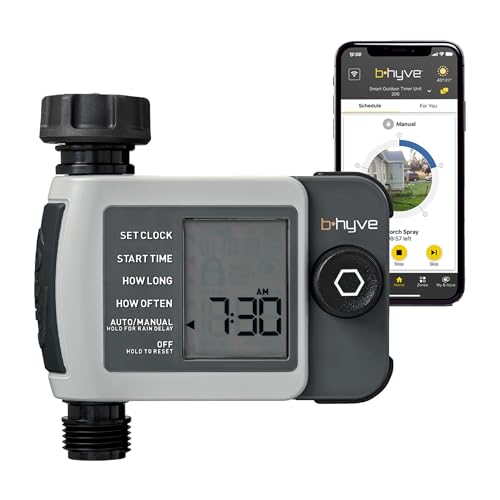
EFFORTLESS AUTO WATERING - Orbit B-hyve XD Smart Hose Timer controls watering based on precise local weather data, ensuring your plants receive the perfect amount of water.
Adjusting Zone Settings
To optimize watering, adjust the settings for each specific zone in your garden. By customizing the watering duration, frequency, and start times for individual zones based on plant needs and soil characteristics, you can prevent over or under-watering.
- Set different watering durations for zones with varying plant types to meet their specific water requirements.
- Adjust the frequency of watering based on factors such as plant maturity, soil type, and weather conditions to avoid water wastage.
- Schedule watering during early morning hours to minimize water loss due to evaporation and ensure optimal absorption by plants.
Utilizing Weather Data for Precision
Integrate weather data into your watering schedule to adapt to changing environmental conditions and avoid unnecessary watering. By leveraging real-time weather information, you can make adjustments to the watering settings automatically.
- Enable weather adjustments on your B-hyve system to account for rainfall, temperature changes, and humidity levels.
- Use rain sensors to prevent watering after rainfall, saving water and preventing waterlogging in your garden.
- Utilize historical weather data to fine-tune your watering schedule over time and optimize water usage.
Monitoring and Remote Access
Regularly monitor your B-hyve Smart Watering System to ensure it operates correctly and efficiently. Utilize the remote access feature to check on your system, adjust settings, and address any issues promptly.
- Check the system status regularly to troubleshoot any connectivity problems, irrigation errors, or schedule inconsistencies.
- Use the remote access functionality to monitor your garden’s watering activity from anywhere, ensuring peace of mind when you’re away from home.
- Adjust settings remotely based on observation and feedback to continuously optimize your watering system’s performance.
By fine-tuning your watering settings, leveraging weather data, and staying vigilant with system monitoring, you can optimize the performance of your B-hyve Smart Watering System for a flourishing and water-efficient garden.
Conclusion
You’ve now mastered the art of programming your B-hyve Smart Watering System. By fine-tuning settings and utilizing weather data, your garden will thrive with efficient watering. Remember to adjust zone settings for tailored care and keep an eye on your system through remote access. With these steps, you’ll ensure your B-hyve system delivers optimal performance for a healthy and water-wise garden. Happy gardening!
Frequently Asked Questions
What is the B-hyve Smart Watering System?
The B-hyve Smart Watering System is a smart irrigation controller that offers features such as smart control, customized watering zones, and remote access for monitoring.
How do I program the B-hyve Smart Watering System?
To program the B-hyve system, use the mobile app to set watering schedules, durations, and frequency based on your garden’s needs. Follow the app’s intuitive interface for easy programming.
What should I do if I encounter issues with the B-hyve Smart Watering System?
If you experience problems, troubleshoot by ensuring proper Wi-Fi connectivity, checking zone settings, and confirming power supply. Refer to the user manual for detailed troubleshooting steps.
How can I optimize the B-hyve Smart Watering System for efficient operation?
Fine-tune watering settings by adjusting schedules based on weather conditions and your plant types. Utilize weather data integration for precise watering and regularly monitor the system through remote access for optimal performance.
What are the benefits of using the B-hyve Smart Watering System?
Using the B-hyve system helps conserve water by customizing watering schedules, adjusting zones, and leveraging smart technology for efficient irrigation, resulting in a healthy and water-efficient garden.
