

Tired of struggling to hear your favorite shows on your Hisense smart TV? Imagine enjoying crystal-clear sound without any hassle. What if we told you that connecting a Bluetooth speaker to your TV is easier than you think?
Picture this: You’re all set to binge-watch your favorite series, but the built-in TV speakers just don’t cut it. You crave that immersive audio experience that only a Bluetooth speaker can provide.
Key Takeaways
- Understand Bluetooth technology for wireless audio transmission between devices.
- Check Bluetooth speaker compatibility with Hisense smart TV for seamless pairing.
- Follow simple steps to connect the Bluetooth speaker to the TV for enhanced audio.
- Adjust audio settings on the TV to optimize sound output.
- Ensure Bluetooth speaker placement and compatibility for a stable connection.
- Enjoy immersive audio experience without cable constraints.
Understanding Bluetooth Technology
Bluetooth technology is a wireless communication standard that allows electronic devices to connect and transfer data over short distances. In the context of connecting a Bluetooth speaker to your Hisense smart TV, understanding how Bluetooth works is essential.
When you pair your Bluetooth speaker with your Hisense smart TV, you are essentially creating a wireless connection between the two devices. This connection enables audio from the TV to be wirelessly transmitted to the speaker, providing you with a hassle-free audio enhancement experience.
Bluetooth operates on a short-range radio frequency, typically around 30 feet, making it ideal for creating personal area networks. It uses a process called pairing to establish a secure connection between devices. During pairing, your TV and speaker exchange unique codes to ensure secure and seamless communication.
Pairing your Bluetooth speaker with your Hisense smart TV involves a straightforward process. You need to ensure that both the TV and the speaker are in pairing mode. Once they discover each other, you can select the speaker from the TV’s Bluetooth menu to complete the connection. Remember to follow the specific instructions in your TV and speaker manuals for accurate pairing steps.
Some Bluetooth speakers also come with additional features like NFC (Near Field Communication) for quick and easy pairing by simply touching the speaker to your TV. This feature simplifies the connection process and enhances user convenience.
Understanding how Bluetooth technology functions and the simple steps involved in pairing your Bluetooth speaker with your Hisense smart TV can significantly elevate your audio experience. By harnessing the power of wireless connectivity, you can enjoy enhanced sound quality and immerse yourself in your favorite movies and shows seamlessly.
Compatibility of Bluetooth Speaker with Hisense Smart TV
When considering the compatibility of a Bluetooth speaker with your Hisense smart TV, it’s essential to ensure a seamless connection for an enhanced audio experience. Bluetooth technology allows wireless communication between devices, such as your TV and speaker, without the hassle of wires. Here’s what you need to know to ensure your Bluetooth speaker works well with your Hisense smart TV.
Recommended Products

Bluetooth connection is not supported. It is incompatible with Fire/Vizio TV.
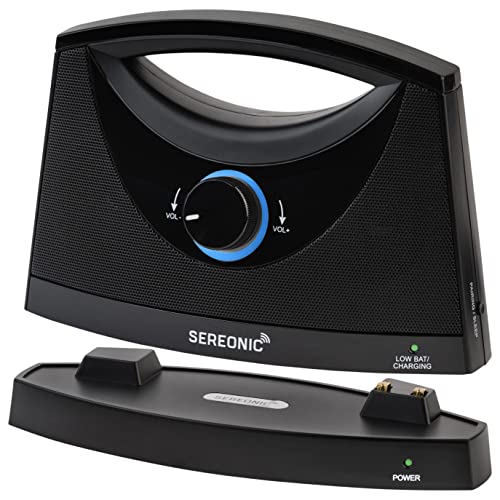
Bring the Sound in Close – Hear every second of your favorite shows, films, and songs, without turning up your TV speakers. Set a wireless speakers for TV from SEREONIC next to you anywhere in your home.

Bring the Sound Close: Hear your favorite shows, films, and songs without turning up the TV. Place the wireless TV speaker next to you for clear audio anywhere in your home.
Bluetooth Version
For optimal compatibility, make sure that the Bluetooth version of your speaker matches or is compatible with the version supported by your Hisense smart TV. The most common Bluetooth versions are 4.0, 4.1, 4.2, and 5.0, each offering different features and improvements. Check the specifications of both your speaker and TV to confirm compatibility.
Bluetooth Profiles
Bluetooth profiles determine the functionalities supported by your devices when connected via Bluetooth. Ensure that both your Bluetooth speaker and Hisense smart TV support compatible profiles for smooth operation. Common Bluetooth profiles for audio streaming include A2DP (Advanced Audio Distribution Profile) and AVRCP (Audio/Video Remote Control Profile). Matching profiles help avoid connectivity issues and ensure a seamless audio experience.
Pairing Process
To connect your Bluetooth speaker to your Hisense smart TV, start by enabling the Bluetooth function on both devices. Enter the pairing mode on the speaker and search for available devices on your TV. Select your speaker from the list of available devices to establish a connection. Once paired, the audio output from the TV will be transmitted to the Bluetooth speaker wirelessly, providing you with better sound quality and an immersive viewing experience.
By verifying Bluetooth compatibility, ensuring matching versions, and understanding the pairing process, you can easily connect your Bluetooth speaker to your Hisense smart TV for an enriched audio experience without the constraints of cables. Enjoy clear sound and immersive entertainment with this wireless setup.
Connecting Bluetooth Speaker to Hisense Smart TV
To connect a Bluetooth speaker to your Hisense Smart TV, follow these simple steps:
Recommended Products

【Hearing Every Word】 Say goodbye to muffled dialogue and hello to our soundbar that brings words to life, making you feel like you're part of the conversation.

Immersive Sound with Enhanced Mid & Low Frequencies: Dive into rich, detailed audio with this soundbar's superior mid and bass performance. Great for music rich in rhythm and depth, ensuring every beat is felt.

【𝐈𝐦𝐩𝐚𝐜𝐭𝐟𝐮𝐥 𝐕𝐨𝐥𝐮𝐦𝐞 𝐁𝐨𝐨𝐬𝐭】: Elevate faint sounds to vibrant with automatic loudness boost. Experience immersive sound through 4 versatile placements—horizontal for distortion-free audio, vertical for room-filling sound, tabletop for vibrant clarity, or wall mount for 360° cinematic magic. Transforms your room into a personal theater.
Steps for Connecting Bluetooth Speaker:
- Turn on Bluetooth on Your Hisense Smart TV:
- Go to the settings menu on your TV.
- Find the Bluetooth settings and turn it on.
- Put Your Bluetooth Speaker in Pairing Mode:
- Refer to your speaker’s manual to know how to enable pairing mode.
- Usually, it involves pressing a specific button for a few seconds until the speaker’s lights blink.
- Pair the Bluetooth Speaker with Your Hisense Smart TV:
- On your TV, search for available Bluetooth devices.
- Select your Bluetooth speaker from the list to establish the connection.
- Confirm Connection:
- Once connected, you should see a notification or indicator on both devices.
- Adjust Volume Settings:
- You can control the volume of the Bluetooth speaker using either the TV remote or the speaker itself.
- Check Compatibility: Ensure that your Bluetooth speaker and Hisense Smart TV support the same Bluetooth version for seamless pairing.
- Optimal Placement: Place the Bluetooth speaker within a reasonable range of your TV to maintain a stable connection.
By following these steps and tips, you can easily connect your Bluetooth speaker to your Hisense Smart TV and enjoy a more immersive audio experience without the hassle of cables.
Adjusting Audio Settings for Bluetooth Speaker
To optimize the audio output when connecting your Bluetooth speaker to your Hisense Smart TV, follow these simple steps to adjust the audio settings:
- Access the TV Menu:
- Press the “Menu” button on your Hisense remote.
- Navigate to “Settings” using the arrow keys.
- Select Sound Settings:
- Find and select “Sound” from the menu options.
- Locate the “Audio Output” or “Speaker” settings.
- Choose Bluetooth Speaker:
- Select the “Bluetooth Speaker” option.
- Ensure your Bluetooth speaker is in pairing mode.
- Adjust Volume Levels:
- Navigate to the volume settings.
- Adjust the volume on both the TV and the Bluetooth speaker for balanced sound.
- Fine-Tune Audio Settings:
- Explore additional audio settings if available.
- Customize bass, treble, or sound modes to suit your preferences.
- Test the Connection:
- Play audio content on your TV.
- Check if the sound is coming through the Bluetooth speaker.
- Troubleshooting:
- If you encounter connectivity issues, ensure the Bluetooth speaker is within range.
- Restart both the TV and the speaker if needed.
- Enjoy Enhanced Audio:
- Sit back and enjoy your favorite shows with improved audio quality.
- Adjust settings further based on your listening experience.
By adjusting the audio settings on your Hisense Smart TV for the connected Bluetooth speaker, you can elevate your viewing experience with clear and immersive sound. Remember to fine-tune settings to your liking for the best audio performance.
Recommended Products

5.1 Channel: Enjoy a true 5.1 channel surround sound, bringing movies, music, and games to life, including a front sound bar, a wireless subwoofer and rear speaker kit.

【𝐃𝐲𝐧𝐚𝐦𝐢𝐜 𝐀𝐮𝐝𝐢𝐨 𝐄𝐱𝐩𝐥𝐨𝐬𝐢𝐨𝐧】: Feel the thunderous highs in action-packed scenes, while enjoying crisp audio and clear dialogue in even the quietest moments. Whether it's a rumbling explosion or a soft whisper, every sound is rich, detailed, and perfectly balanced to transform your space into a cinematic experience.

𝐑𝐆𝐁 𝐋𝐢𝐠𝐡𝐭𝐢𝐧𝐠 & 𝐋𝐄𝐃 𝐃𝐢𝐬𝐩𝐥𝐚𝐲 - Enhance your entertainment setup with RGB lighting and a clear LED display, making this soundbar for TV both functional and stylish.
Enhancing TV Audio Experience with Bluetooth Speaker
When upgrading your Hisense smart TV audio with a Bluetooth speaker, you can significantly enhance your viewing experience. Here’s how to seamlessly connect the Bluetooth speaker to your TV:
Pairing Your Devices
To begin, ensure that both your Hisense smart TV and Bluetooth speaker are powered on. Next, follow these steps to pair them:
- Enable Bluetooth on Your TV: Go to the TV settings and turn on the Bluetooth feature.
- Put the Speaker in Pairing Mode: Press and hold the pairing button on your Bluetooth speaker to make it discoverable.
- Select the Speaker on Your TV: Look for the Bluetooth speaker’s name in the list of available devices on your TV and select it.
- Confirm the Connection: Once selected, confirm the pairing request on both devices.
Adjusting Volume Settings
After successfully pairing your devices, it’s essential to adjust the volume settings for optimal audio output:
- Volume Control: Use the TV remote to control the volume level on the connected Bluetooth speaker.
- Fine-Tuning Audio: Access the sound settings on your TV to fine-tune bass, treble, and other audio attributes for a customized experience.
Ensuring Compatibility and Placement
To ensure a stable connection and seamless operation, consider the following:
- Compatibility Check: Verify that your Bluetooth speaker is compatible with your Hisense smart TV for trouble-free pairing.
- Optimal Placement: Position the Bluetooth speaker within the recommended range for reliable connectivity and enhanced sound quality.
Testing and Enjoying Enhanced Audio
Once you’ve completed the setup, it’s time to test the connection and enjoy superior audio:
- Testing the Connection: Play a video or audio content on your TV to test the audio output through the Bluetooth speaker.
- Troubleshooting: In case of connectivity issues, recheck the pairing steps and device compatibility.
- Immersive Experience: Sit back, relax, and immerse yourself in a high-quality audio experience without cable constraints.
By following these straightforward steps and tips, you can effortlessly connect your Bluetooth speaker to your Hisense smart TV, transforming your viewing experience with enhanced audio quality.
Conclusion
You’re now equipped with the knowledge to seamlessly connect your Bluetooth speaker to your Hisense smart TV. By following the simple steps outlined in this guide, you can elevate your audio experience and enjoy immersive entertainment with superior sound quality. Say goodbye to the limitations of traditional cables and embrace the convenience of wireless connectivity. Enhance your TV viewing experience by immersing yourself in crystal-clear audio that complements your favorite shows and movies. With just a few adjustments and troubleshooting tips, you’ll be well on your way to transforming your living room into a personal theater. Connect, adjust, and enjoy the enhanced audio quality that a Bluetooth speaker can bring to your Hisense smart TV.
Frequently Asked Questions
Can I improve the audio quality on my Hisense smart TV?
Yes, you can enhance the audio quality on your Hisense smart TV by connecting a Bluetooth speaker for a better viewing experience.
How does Bluetooth technology help improve the audio on my TV?
Bluetooth allows wireless connectivity between your Hisense smart TV and the Bluetooth speaker, providing a seamless audio transmission within a 30-foot range.
What steps are involved in connecting a Bluetooth speaker to my TV?
Key steps include pairing the devices, adjusting volume settings, ensuring compatibility and placement, testing the connection, troubleshooting if needed, and enjoying enhanced audio.
Why should I consider using a Bluetooth speaker with my TV?
Using a Bluetooth speaker with your Hisense smart TV can greatly improve the audio quality, providing a more immersive and enjoyable viewing experience without the limitations of cables.
