

Do you ever find yourself fumbling with multiple devices and wish there was a simpler way to control them all? Picture this: you’re relaxing on the couch, wanting to turn on your favorite lamp without getting up. What if you could do it with just a tap on your phone? That’s where setting up a smart plug comes in handy.
In this article, you’ll discover the easy steps to set up your smart plug effortlessly. Say goodbye to the hassle of manually switching devices on and off. With a smart plug, you can conveniently manage your appliances from anywhere, whether you’re at home or on the go. Ready to simplify your life with smart technology? Let’s dive in and make your living space a little smarter.
Key Takeaways
- Smart plugs offer convenience by allowing remote control of devices through smartphone apps or voice assistants.
- They promote energy efficiency by enabling scheduling of device usage, leading to cost savings.
- Smart plugs provide remote access, enabling control of devices from anywhere for added security and peace of mind.
- Setting up smart plugs involves plugging them into outlets, connecting to Wi-Fi networks, pairing with devices, and utilizing control options through apps or voice commands.
- Preparation steps include gathering materials, identifying suitable locations, setting up accounts, and familiarizing yourself with apps to ensure a smooth installation process.
- Troubleshooting tips for common issues like connectivity problems, app-related challenges, power interruptions, and voice control issues can resolve setup and operational issues efficiently.
Understanding Smart Plugs
To grasp the functionality of smart plugs, imagine having the power to control your devices remotely as easily as pressing a button. Smart plugs act as adapters between your regular home appliances and the power outlet, enabling you to manage them through a smartphone or voice command.
Benefits of Smart Plugs
- Convenience: Picture being able to turn on your coffee maker from bed in the morning without having to walk to the kitchen.
- Energy Efficiency: Smart plugs allow you to schedule when your devices turn on and off, helping you save on electricity costs.
- Remote Access: You can control your devices even when you’re away from home, giving you peace of mind and added security.
How Smart Plugs Work
- Setup Process: After plugging your smart plug into a power outlet, connect it to your home Wi-Fi network using a smartphone app.
- Device Pairing: Pair the smart plug with your desired device, whether it’s a lamp, fan, or coffee machine.
- Control Options: Utilize the app or your smart assistant (like Amazon Alexa or Google Assistant) to manage when your devices should turn on or off.
- Home Automation: Set schedules for your lights to turn on and off automatically, creating the illusion that someone is home, deterring potential intruders.
- Energy Monitoring: Some smart plugs offer energy consumption data, letting you track how much power your devices use.
- Voice Control: With voice assistants, you can command your smart plug to control devices with simple voice prompts.
Understanding smart plugs opens up a world of possibilities in making your home more efficient, secure, and convenient. By incorporating smart plugs into your daily routine, you can enjoy the benefits of a connected home ecosystem where managing your devices is as simple as a swipe on your phone.
Preparing for Setup
Before diving into setting up your smart plug, there are a few essential steps you should take to ensure a smooth installation process. These preparation tasks will help you get ready to connect your smart plug to your home network and start using it with your devices effectively. Here’s what you need to do:
Recommended Products

Wireless App Control: Use the Govee Home App to access the Smart Plug via WiFi and Bluetooth to enjoy powerful control and convenient features no matter where you are. Note: Don't support 5G WiFi.

Voice control: Kasa smart plugs that work with Alexa and Google Home Assistant. Enjoy the hands free convenience of controlling any home electronic appliances with your voice via Amazon Alexa or Google Assistant. Compatible with Android 5.0 or higher and iOS 10.0 or higher

Voice control: Kasa smart plugs that work with Alexa and Google Home Assistant. Enjoy the hands free convenience of controlling any home electronic appliances with your voice via Amazon Alexa or Google Assistant
Gathering Your Materials
To start setting up your smart plug, gather the necessary materials:
- Smart plug: Make sure you have the smart plug you intend to set up.
- Smartphone or tablet: You’ll need a mobile device with the compatible app for your smart plug.
- Home Wi-Fi network: Ensure your Wi-Fi network is stable and running.
Identifying the Right Location
Next, find a suitable location for your smart plug:
- Accessibility: Choose a spot where the smart plug can be easily accessed.
- Wi-Fi range: Ensure the location has good Wi-Fi coverage for seamless connectivity.
- Safety: Keep the smart plug away from water sources or heat-producing appliances.
Setting Up Your Account
Before beginning the setup process, create an account with the smart plug’s app:
- Download the app: Visit the App Store or Google Play Store to download the app.
- Account creation: Follow the app’s instructions to create your account.
- Login: Sign in to your account to prepare for the setup process.
Familiarizing Yourself with the App
Take some time to explore the app’s features and settings:
- Navigation: Get comfortable with the app’s layout and menus.
- Device compatibility: Check if your devices are compatible with the app.
- Settings: Review and adjust any settings as needed for optimal usage.
Preparing Your Devices
Ensure the devices you want to control with the smart plug are ready:
- Charging: Ensure the devices are fully charged or adequately powered.
- Compatibility: Confirm that your devices can connect to the smart plug.
- Placement: Position your devices within reach of the smart plug for control.
By following these preparation steps, you’ll be ready to proceed with setting up your smart plug seamlessly. Once everything is in place, you can move on to the next stage of the setup process, bringing you closer to enjoying the convenience and control offered by your smart plug.
Setting Up the Smart Plug
To effectively set up your smart plug, follow these straightforward steps for a hassle-free experience.
Recommended Products

Stability Upgrade Quick Connection:Supports Bluetooth or WiFi connection.The improved WiFi technology let you quick connection and stay stable,no disconnection worries. Please keep the smart plug connected to your stable 2.4GHz network.(Note: Only 2.4Ghz WiFi)

Stability Upgrade Quick Connection:Supports Bluetooth or WiFi connection.The improved WiFi technology let you quick connection and stay stable,no disconnection worries. Please keep the smart plug connected to your stable 2.4GHz network.(Note: Only 2.4Ghz WiFi)
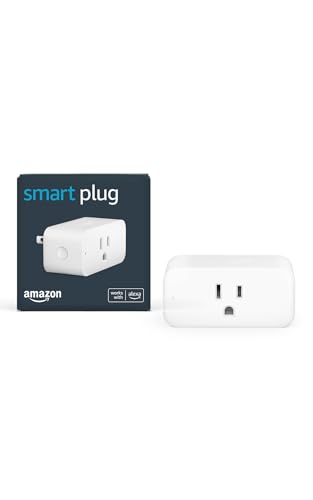
Amazon Smart Plug works with Alexa to add voice control to any outlet.
Preparation Steps:
- Gather Your Materials: Before starting, make sure you have your smart plug, the device you want to connect it to (e.g., a lamp), a stable Wi-Fi connection, and your smartphone with the compatible app installed.
- Identify the Right Location: Choose a suitable outlet that is easily accessible and within reach of your Wi-Fi signal to ensure proper connectivity.
- Set Up Your Account: Open the smart plug app on your smartphone and create an account if you don’t have one already. Log in to proceed with the setup process.
- Familiarize Yourself with the App: Take a moment to explore the app’s interface and features. Get comfortable navigating through the settings for a smooth setup.
- Prepare Your Device: Ensure that the device you wish to connect to the smart plug is ready and functioning correctly. For instance, if it’s a lamp, make sure it’s plugged in and turned on.
- Plug in the Smart Plug: Insert the smart plug into the chosen outlet. Ensure it’s securely in place and ready to be paired with your smartphone.
- Pair the Smart Plug: Follow the app’s instructions to pair the smart plug with your smartphone. This process may involve connecting to the plug’s Wi-Fi network or scanning a QR code.
- Connect Your Device: Once the smart plug is paired, plug your device (e.g., lamp) into the smart plug. You should now be able to control the device remotely through the app.
- Explore Control Options: Test the app’s control options to turn the connected device on and off remotely. Familiarize yourself with scheduling features for automated control.
- Additional Features: Discover and explore optional features such as home automation, energy monitoring, and voice control based on your preferences and needs.
By following these steps, you’ll be able to set up your smart plug efficiently and enjoy the convenience of remotely controlling your devices with ease.
Troubleshooting Common Issues
When setting up your smart plug, you might encounter a few common issues that can be easily resolved. Here are some troubleshooting tips to help you address these issues:
Recommended Products

Stability Upgrade: Supports Bluetooth or WiFi connection, which is more stable and faster than plugs that can only be connected through WiFi. No disconnection worries, control all your home appliances and devices anytime & anywhere.
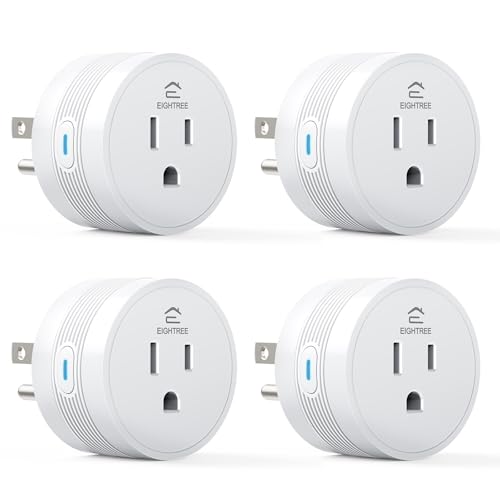
[15A High-Load Smart Plug for Home Appliances]: Designed for high-power devices such as coffee makers, heaters, air conditioners, and kitchen appliances that standard smart plugs can’t handle safely.

Warm Tips: To use Alexa and Google Home for voice control, please connect the plug with the “Smart Life” app first. Then go to Me > Third-Party Services to link with Alexa/Google. Note: Direct connection to Alexa is not supported.
Connectivity Problems with the Smart Plug
If you’re facing connectivity issues with your smart plug, try the following steps:
- Verify Wi-Fi Connection: Ensure that your Wi-Fi network is stable and working properly.
- Restart Router: Turn off your router for a minute, then switch it back on to reset the connection.
- Check Signal Strength: Make sure the smart plug is within range of your Wi-Fi signal for a stable connection.
- Reset Smart Plug: Press the reset button on the smart plug and reconfigure it following the setup process.
App-Related Challenges
If you’re having issues with the mobile app controlling your smart plug, consider the following solutions:
- App Update: Ensure that your app is updated to the latest version for compatibility.
- Restart App: Close the app completely and relaunch it to resolve any temporary glitches.
- Reconfigure Smart Plug: Delete the plug from the app and re-add it following the setup instructions.
Power Supply Interruptions
In case your smart plug isn’t receiving power or functioning correctly, take these actions:
- Check Power Source: Confirm that the plug is securely connected to a functioning power outlet.
- Power Cycle: Unplug the smart plug, wait for a few seconds, and plug it back in to restart.
- Inspect Wiring: Examine the plug and socket for any damage or loose connections that might affect power supply.
Voice Control Issues
If voice commands are not working as expected, troubleshoot the following:
- Voice Assistant Setup: Ensure that your voice assistant is properly linked to the smart plug in the app settings.
- Confirm Voice Commands: Check if you are using the correct voice commands for controlling the plug.
- Re-train Voice Assistant: If necessary, re-train your voice assistant for improved recognition.
By implementing these troubleshooting guidelines, you can quickly overcome common issues that may arise during the setup and operation of your smart plug, ensuring a seamless experience in managing your household devices.
Conclusion
Setting up your smart plug is a simple process that offers you the convenience of controlling your devices with ease. By following the steps outlined in this article, you can enjoy the benefits of energy efficiency, remote access, and seamless integration into your daily routine. Remember to gather the necessary materials, choose the right location, and pair your devices effectively to make the most of your smart plug. With features like home automation and voice control at your fingertips, managing your household appliances has never been more convenient. Embrace the future of technology by incorporating a smart plug into your home setup, and enjoy the convenience it brings to your everyday life.
Frequently Asked Questions
What is a smart plug and how does it work?
A smart plug is a device that plugs into a standard electrical outlet and allows you to control connected appliances remotely using a smartphone or voice commands. It works by connecting to your home Wi-Fi network, enabling you to turn devices on or off, set schedules, monitor energy usage, and more.
What are the benefits of using a smart plug?
Using a smart plug offers various benefits, including convenience by allowing you to control appliances from anywhere, energy efficiency by scheduling devices to reduce standby power consumption, and remote access to manage devices even when you’re not at home.
How do I set up a smart plug?
To set up a smart plug, you need to plug it into an outlet, download the corresponding app on your smartphone, connect the plug to your Wi-Fi network, pair it with the app, and start controlling your devices. Additional features like home automation and voice control can be explored after setup.
