

Do you ever find yourself fumbling in the dark, wishing you could control your lights with just a tap on your phone? Imagine coming home to a warmly lit house, all set with a touch of a button. If you’re tired of the hassle of traditional light switches, you’re in for a treat.
In this article, you’ll discover a world of convenience and innovation as we explore which smart lights are compatible with Apple HomeKit. Say goodbye to the days of wandering around in the dark or getting up to adjust the lighting. With the right smart lights, you can transform your living space into a personalized oasis of comfort and style, all effortlessly managed through your Apple devices. Get ready to illuminate your home in ways you never thought possible.
Key Takeaways
- Apple HomeKit allows seamless control of smart lights through iPhones, iPads, and Siri voice commands.
- Look for the “Works with Apple HomeKit” label to ensure smart light compatibility with the Apple ecosystem.
- Setting up Apple HomeKit-compatible smart lights involves adding them to the Home app for individual control or automated scenes.
- Integration with other HomeKit devices enables unified smart home experiences like adjusting lights, thermostat, and locks simultaneously.
- Siri voice control offers hands-free management of smart lights, allowing for commands like turning lights on/off or adjusting brightness.
- Remote access with Apple HomeKit compatibility enables control of smart lights from anywhere using the Home app on iPhones, enhancing convenience and security.
Understanding Apple HomeKit Compatibility
To understand how smart lights work with Apple HomeKit, it’s essential to grasp the concept of compatibility. Apple HomeKit is a framework that allows smart home devices, including smart lights, to be controlled using Apple devices like iPhones, iPads, and even Siri voice commands. When a smart light is compatible with Apple HomeKit, it means that it can seamlessly integrate and communicate with other HomeKit-enabled devices, offering you a comprehensive smart home experience.
- Compatibility Requirements: For a smart light to work with Apple HomeKit, it must meet specific requirements set by Apple. These requirements ensure that the device can connect securely to your Apple ecosystem and be controlled via the Home app or Siri. Look for the “Works with Apple HomeKit” label when choosing smart lights to ensure compatibility.
- Setup Process: Setting up smart lights that are compatible with Apple HomeKit is usually straightforward. You’ll need to add the light to the Home app on your Apple device by scanning a unique HomeKit setup code or using the manufacturer’s app to connect it to your HomeKit network. Once added, you can control the light individually or as part of automated scenes.
- Integration with Other HomeKit Devices: One of the key benefits of Apple HomeKit compatibility is the ability to create a unified smart home ecosystem. Your HomeKit-enabled smart lights can interact with other devices like smart thermostats, cameras, and door locks. For example, you can set up a scene that turns on the lights, adjusts the thermostat, and locks the doors simultaneously.
- Voice Control with Siri: Apple HomeKit allows you to control your smart lights with simple voice commands using Siri. You can ask Siri to turn lights on or off, adjust brightness, or even set specific lighting scenes without needing to touch your Apple device.
- Remote Access: With Apple HomeKit compatibility, you can control your smart lights remotely, even when you’re away from home. Whether you’re at work or traveling, you can use the Home app on your iPhone to manage your lights, ensuring that your home is well-lit and secure.
Understanding Apple HomeKit compatibility opens up a world of possibilities for integrating smart lights into your smart home ecosystem seamlessly. By choosing lights that are compatible with Apple HomeKit, you can enjoy a convenient, intuitive, and connected lighting experience tailored to your preferences.
Best Smart Lights Brands Compatible with Apple HomeKit
When considering the best smart lights brands that work seamlessly with Apple HomeKit, you have a variety of options to choose from. Here are some top brands renowned for their compatibility and performance within the Apple HomeKit ecosystem:
Recommended Products

【Note】Please ensure the bulb fits your lamp before buying to avoid trouble. It supports only 2.4Ghz WiFi, not 5.0Ghz. Smart bulbs usually don't work with dimmer switches, which may cause flickering, burning out, or buzzing. To dim the lights, use Hub/Apps

【Powerful Smart Matter】Linkind 120V smart light bulb is certified for Matter platform used for integrating all your smart home devices into one control system, fitting for users with multiple smart gadgets. It eliminates the need for switching between multiple apps, enhancing your smart home experience. It works seamlessly with Matter-certified hubs (HomePod, Echo, Nest etc.) allowing for multi-platform control, or directly via AiDot app with no extra hubs needed, offering flexible usage for different home setups.
Philips Hue
Philips Hue is a leading brand in the smart lighting industry known for its extensive compatibility with Apple HomeKit. With Philips Hue smart lights, you can easily control your lighting using Siri voice commands or through the Apple Home app on your iPhone or iPad. Enjoy features like customizable color options, dimming capabilities, and integration with other HomeKit-enabled devices.
LIFX
LIFX smart lights are another popular choice for Apple HomeKit users. These lights offer vibrant colors, convenient app control through Siri, and the ability to create custom lighting schedules to suit your lifestyle. With LIFX smart lights, you can enhance the ambiance of your home while enjoying the seamless integration with Apple HomeKit.
Nanoleaf
Nanoleaf smart light panels are not only visually stunning but also fully compatible with Apple HomeKit. These modular lighting panels can be controlled using Siri commands, allowing you to create unique lighting designs and moods in any room. Experience the futuristic appeal of Nanoleaf smart lights while enjoying the convenience of Apple HomeKit integration.
Yeelight
Yeelight smart lights are an excellent choice for those looking for affordable yet reliable options that work well with Apple HomeKit. With Yeelight, you can adjust brightness levels, set scenes, and manage your lights remotely using your Apple devices. The seamless integration of Yeelight smart lights with Apple HomeKit enhances the overall smart home experience.
Sylvania
Sylvania offers a wide range of smart lighting products that are compatible with Apple HomeKit, providing users with versatile lighting solutions. Whether you prefer smart bulbs, light strips, or smart plugs, Sylvania has options that seamlessly connect to Apple HomeKit for effortless control. Enhance your home’s lighting environment with Sylvania smart lights and Apple HomeKit integration.
Explore these top smart lights brands that are compatible with Apple HomeKit to elevate your smart home lighting experience and enjoy the convenience of controlling your lights with ease.
Factors to Consider When Choosing Smart Lights for Apple HomeKit
When selecting smart lights that work seamlessly with Apple HomeKit, several essential factors can guide your decision-making process. Below are key aspects to consider:
Recommended Products

Voice Control: Meross smart light bulbs 60 watt compatible with Apple HomeKit, Apple Watch, Siri, Alexa Echo, Echo Dot, Google Assistant and SmartThings. Control your alexa light bulb via voice command to turn on/off or dim/brighten your smart LED light effortlessly. (e.g. ‘Hey Siri, set the bedroom light to green’)
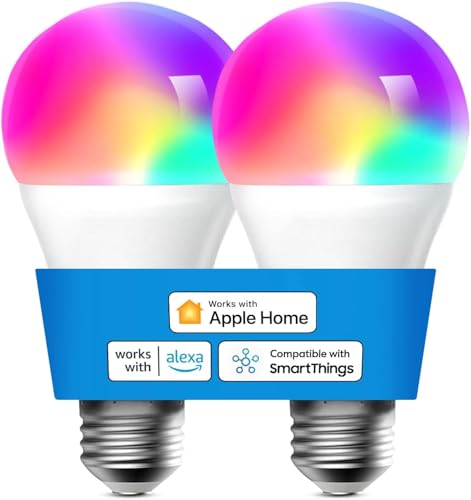
Remote Control: Control smart bulbs via Apple HomeKit or Meross app over 2.4GHz Wi-Fi (no hub required). Adjust settings remotely from anywhere with internet access. Data encrypted and stored securely on Amazon AWS.

FOR EVERY ROOM. EVERY DAY. — Full color RGBW smart bulbs with tunable white from warm 2700K to crisp 6500K, delivering 800 lumens of comfortable, true-to-life light. CRI 90 color accuracy means every shade looks right — whether you're winding down or lighting up your workspace.
Compatibility with Apple HomeKit
Ensure the smart lights you choose are specifically compatible with Apple HomeKit to integrate smoothly into your smart home ecosystem. This compatibility ensures that you can control your lights using Apple devices like iPhones, iPads, or Apple Watches without any compatibility issues.
Brand Reputation and Reliability
Opt for reputable brands known for their reliability and quality in the smart lighting industry. Brands like Philips Hue, LIFX, Nanoleaf, Yeelight, and Sylvania have established themselves as trusted names offering a wide range of smart lighting solutions that seamlessly work with Apple HomeKit.
Features and Functionality
Evaluate the features offered by the smart lights, such as color customization options, brightness settings, dimming capabilities, and compatibility with various lighting fixtures. Consider whether the smart lights provide additional functionalities like schedules, scenes, or geofencing for added convenience.
Voice Control Integration
Check if the smart lights support voice control via Siri for hands-free operation. This feature allows you to adjust the lighting settings using voice commands, enhancing the overall convenience and user experience.
Expansion Capabilities
Consider the scalability of the smart lighting system for future expansion. Opt for lights that can easily integrate with other HomeKit-compatible devices to create a comprehensive smart home setup that meets your evolving needs.
Price and Value
Balance the cost of the smart lights with the features and benefits they offer to ensure you are getting value for your investment. Compare prices across different brands and models while considering long-term reliability and customer support.
By taking these factors into account, you can make an informed decision when selecting smart lights that are compatible with Apple HomeKit, enhancing your smart home lighting experience.
Setup Process for Smart Lights with Apple HomeKit
To set up smart lights that work seamlessly with Apple HomeKit, follow these straightforward steps:
- Check Compatibility:
- Before purchasing smart lights, ensure they are compatible with Apple HomeKit. Look for the “Works with Apple HomeKit” label on the packaging or product description.
- Download Manufacturer App:
- Once you have your smart lights, download the manufacturer’s app from the App Store. This app will assist you in setting up and controlling the lights.
- Install Lights:
- Install the smart lights according to the manufacturer’s instructions. Ensure they are connected to a stable Wi-Fi network.
- Add Lights to HomeKit:
- Open the manufacturer’s app and follow the steps to add the lights to Apple HomeKit. This usually involves scanning a QR code or entering a pairing code.
- Assign Rooms and Zones:
- Organize your smart lights by assigning them to specific rooms and zones within the Home app. This helps you control them more efficiently.
- Create Scenes and Automations:
- Enhance your smart lighting experience by creating scenes like “Movie Night” or setting up automations to have the lights turn on/off at specific times.
- Voice Control with Siri:
- Once the setup is complete, you can use Siri voice commands to control your smart lights. Simply say, “Hey Siri, turn off the bedroom lights.”
- Remote Access:
- Enjoy the convenience of remotely controlling your lights. Whether you’re away from home or in another room, you can adjust the lighting using your Apple device.
By following these steps, you can easily set up and enjoy the convenience of smart lights compatible with Apple HomeKit in your home. Explore the various features and customization options to create the perfect ambiance for every occasion.
Recommended Products

【Matter-enabled】With Matter, Skip the step of downloading and registering multiple manufacturers' apps every time you buy a new device. Instead, head straight to certified smart home platforms like Apple Home, Alexa, Google Home, or AiDot to control all your Matter devices.【TIP】Matter-certified hub or controller (HomePod, Echo Dot, Nest,) is required for Apple Home/Alexa/Google Home platforms. Alternatively, the AiDot app can be used without hub

SUPERCOLOR. INCOMPARABLE BRIGHTNESS. — LIFX SuperColor color changing light bulbs deliver 800 lumen light bulb brightness and billions of vivid RGB light bulbs colors at 5x the depth of ordinary LED bulbs. With 82+ CRI every shade is true. One color changing smart bulb that transforms every room.
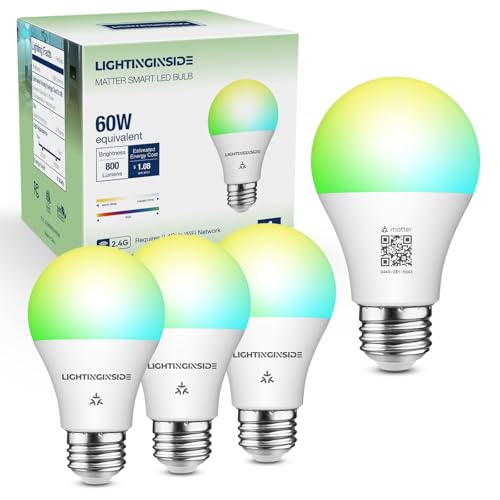
Easy to Set Up: These smart bulbs are easy to set up with 2.4 GHz WiFi. Just screw in your Matter bulb, download your preferred Matter-certified app, and scan the QR code on the bulb or user manual to finish the next instructions in an app. After that, you can sync the bulb to other apps using a new code from the first app if you prefer multi-admin interoperation. This standard A19 E26 LED bulb can be used in any E26 sockets for home or business light fixtures.
Troubleshooting Common Smart Lights Compatibility Issues with Apple HomeKit
When setting up smart lights with Apple HomeKit, you might encounter some compatibility issues that can be easily resolved with a few troubleshooting steps. Here’s how you can address common problems:
Connectivity Concerns
If your smart lights are not responding to commands from the Home app or Siri, first check the Wi-Fi connection. Ensure that your smart lights are properly connected to a stable Wi-Fi network. Weak connectivity can disrupt communication between your Apple devices and the smart lights.
Firmware Updates
Keep your smart lights’ firmware up to date. Manufacturers often release firmware updates to improve compatibility with Apple HomeKit. Check the manufacturer’s app or website for any available updates and install them to ensure smooth operation with HomeKit.
HomeKit Code Verification
During the setup process, you need to scan the HomeKit code provided with your smart lights. If the code is not recognized or fails to pair with HomeKit, double-check the code for accuracy. Make sure there are no obstructions or glare affecting the scanning process.
Restart Devices
Sometimes, a simple restart can solve connectivity issues. Try restarting your Apple device, the smart lights, and the Wi-Fi router. This can refresh the connection and resolve any temporary glitches that may be causing compatibility problems.
Router Configuration
Check your router settings to ensure that it supports the requirements for Apple HomeKit. Some routers may have specific configurations or security settings that can impact the communication between your devices. Refer to Apple’s guidelines for router compatibility with HomeKit.
Reset HomeKit Configuration
If you are still experiencing issues, you can reset the HomeKit configuration and set up your smart lights again. This process can help clear any previous settings that might be causing conflicts. Follow the steps outlined in the Home app to reset and reconfigure your smart lights.
By addressing these common compatibility issues, you can troubleshoot and resolve any challenges you may encounter when integrating smart lights with Apple HomeKit. Ensuring a seamless connection will enhance your smart home experience and allow you to fully utilize the features of HomeKit with your smart lighting setup.
Conclusion
You now have a solid understanding of the benefits of using smart lights compatible with Apple HomeKit and how to troubleshoot common compatibility issues. Remember to choose smart lights that align with your preferences and needs. Brands like Philips Hue, LIFX, Nanoleaf, Yeelight, and Sylvania offer great options for your smart lighting setup. By following the troubleshooting tips provided, you can ensure a seamless experience with Apple HomeKit and enjoy the convenience and control it brings to your smart home. Keep exploring the possibilities of smart lighting integration with Apple HomeKit to enhance your living space.
Frequently Asked Questions
What are the benefits of using smart lights compatible with Apple HomeKit?
Using smart lights with Apple HomeKit offers convenience, personalization, integration with other devices, voice control through Siri, and remote access for enhanced home automation.
How do I choose the right smart lights for my Apple HomeKit setup?
Consider factors like compatibility with Apple HomeKit, brand reputation, the type of lighting (e.g., color-changing, dimmable), price, and additional features like scheduling and energy efficiency.
What are some recommended brands for smart lights compatible with Apple HomeKit?
Top brands to consider include Philips Hue, LIFX, Nanoleaf, Yeelight, and Sylvania for their reliability, quality, and extensive features that enhance the smart lighting experience.
How can I troubleshoot compatibility issues with Apple HomeKit and smart lights?
Troubleshooting steps may involve checking for firmware updates, ensuring proper connectivity, verifying the HomeKit pairing code, restarting devices, adjusting router configurations, and resetting HomeKit configurations to resolve connectivity issues for seamless integration.
