
Do you ever find yourself constantly adjusting your thermostat to get the perfect temperature at home? Imagine having a smart thermostat that learns your preferences and creates a comfortable environment effortlessly. If you’re curious about upgrading to a smart thermostat but not sure where to start, you’re in the right place.
Picture this: arriving home to a cozy space without lifting a finger, all thanks to a smart thermostat. In this article, you’ll discover everything you need to know about setting up your smart home with this innovative technology. From compatibility requirements to installation tips, we’ve got you covered.
By the end of this read, you’ll be equipped with the knowledge to transform your living space into a modern, energy-efficient haven with the help of a smart thermostat. Let’s dive in and make your home smarter and more comfortable.
Key Takeaways
- Smart thermostats offer convenience by learning your temperature preferences and adjusting settings automatically.
- Remote access through smartphone connectivity allows you to control the thermostat from anywhere.
- Energy efficiency is a key benefit, leading to cost savings over time by optimizing energy consumption.
- Ensure compatibility with your HVAC system for seamless integration before purchasing a smart thermostat.
- Consider features like geofencing, energy reports, and voice control for an enhanced smart home experience.
Understanding Smart Thermostats
Let’s delve into the intricacies of smart thermostats to comprehend how this technology can elevate your home environment effortlessly.
Key Features to Note:
- Smart thermostats can adjust temperatures based on your habits. They learn your usage patterns, ensuring comfort without constant manual tweaks.
- Remote Access: With smartphone connectivity, you can control your thermostat from anywhere. Imagine ensuring the perfect temperature even before you walk through the door.
- Energy Efficiency: By optimizing usage, smart thermostats help reduce energy consumption, translating to cost savings over time.
- Compatibility Considerations: Ensure your home’s compatibility with the smart thermostat model you choose for seamless integration.
Benefits Galore:
- Convenience: No more manual adjustments; your smart thermostat adapts to your lifestyle.
- Energy Savings: Enjoy lower utility bills as your thermostat optimizes energy usage efficiently.
- Environmental Impact: By reducing unnecessary energy consumption, you contribute to a healthier planet.
Installation Insights:
- DIY vs. Professional Installation: Depending on your comfort level, you can opt for a DIY installation or hire a professional for assistance.
- Tips for Installation: Follow the manufacturer’s instructions carefully, ensure a stable Wi-Fi connection, and consider the thermostat’s placement for optimal performance.
- Verify compatibility with your HVAC system before purchasing a smart thermostat to avoid installation challenges.
- Look for compatibility with popular platforms like Google Home or Amazon Alexa if you plan to integrate your thermostat into a larger smart home ecosystem.
Understanding smart thermostats gives you the power to transform your living space into a tech-savvy, energy-efficient haven. Embrace this technology to experience comfort, convenience, and cost savings at your fingertips.
Benefits of Installing a Smart Thermostat
Enhance Your Comfort:
Enjoy a cozy environment as your smart thermostat learns your temperature preferences and adjusts accordingly. Imagine returning home to a perfectly comfortable space without the need for manual tweaks – it’s like having your ideal climate waiting for you.
Save on Energy Costs:
With a smart thermostat, you can optimize your energy usage by automatically adjusting temperatures based on your habits and schedule. This intelligent control allows you to reduce energy waste, leading to potential cost savings on your utility bills in the long run.
Contribute to the Environment:
By using a smart thermostat to efficiently heat or cool your home, you’re not only benefiting financially but also making a positive impact on the environment. Decreasing energy consumption helps lower your carbon footprint, promoting a greener lifestyle.
Remote Access and Control:
One of the significant advantages of a smart thermostat is the ability to control your home’s temperature remotely. Whether you’re at work, on vacation, or simply lounging on the couch, you can adjust the settings using your smartphone, ensuring comfort and savings even when you’re away.
Seamless Integration with Smart Home Systems:
Smart thermostats are designed to seamlessly integrate with other smart home devices, creating a connected ecosystem for enhanced convenience. You can synchronize your thermostat with voice assistants, smart lights, or even your security system for a fully automated and efficient home experience.
Immediate Feedback and Insights:
Get real-time feedback on your energy usage and receive insights on how to optimize your heating and cooling patterns for increased efficiency. By staying informed about your consumption habits, you can make informed decisions to further enhance your energy-saving efforts.
Enhanced Comfort, Cost Savings, and Eco-Friendly Practices:
By embracing the benefits of installing a smart thermostat, you’re not only improving your comfort but also saving on energy costs and contributing to a sustainable environment. Transform your living space into a tech-savvy haven with a smart thermostat that prioritizes your comfort, convenience, and environmental impact.
Features to Consider
When selecting a smart thermostat for your home, it’s essential to consider various features that will enhance your comfort and efficiency. Here are key aspects to keep in mind:
- Compatibility
Ensure that the smart thermostat you choose is compatible with your current heating and cooling system. Most smart thermostats work with conventional systems, while some are designed for specific setups like dual fuel or heat pump systems. - Mobile App Integration
Look for a smart thermostat that offers user-friendly mobile app integration. This feature allows you to control the temperature settings remotely from your smartphone, providing convenience and flexibility, especially when you’re away from home. - Learning Capabilities
Opt for a smart thermostat with learning capabilities that adapt to your schedule and preferences over time. These thermostats can adjust the temperature based on your behavior, saving energy and maximizing comfort without manual intervention. - Geofencing Technology
Consider a smart thermostat with geofencing technology that uses your smartphone’s location to adjust the temperature when you leave or return home. This feature helps in optimizing energy usage by adjusting the settings automatically based on your proximity. - Energy Usage Reports
Choose a smart thermostat that provides detailed energy usage reports to help you track and analyze your consumption patterns. By gaining insights into your heating and cooling habits, you can make informed decisions to increase efficiency and reduce your energy bills. - Voice Control Compatibility
Select a smart thermostat that is compatible with voice control assistants like Alexa or Google Assistant. Voice control adds another layer of convenience, allowing you to adjust the temperature settings using simple voice commands. - Integrations with Smart Home Ecosystem
Look for a smart thermostat that seamlessly integrates with other smart home devices and ecosystems. This integration enables a cohesive smart home experience, where your thermostat can work in harmony with other connected devices for enhanced automation and convenience.
By considering these features when choosing a smart thermostat, you can ensure that you select a device that meets your specific needs and preferences while enhancing the overall comfort and efficiency of your home.
Additional Equipment Needed
When setting up your smart thermostat, you’ll need to ensure you have the right additional equipment to make the installation process smooth and efficient. Here’s what you’ll need:
1. C-Wire
For most smart thermostats, having a C-wire, also known as a common wire, is essential for proper functioning. The C-wire provides a continuous flow of power to your thermostat, ensuring it can maintain a stable connection to your HVAC system and Wi-Fi network.
2. Power Extender Kit
If your current HVAC system lacks a C-wire, you might need a power extender kit. This kit helps power your smart thermostat without a C-wire and is a practical solution for older homes or systems that don’t have the necessary wiring.
3. Wi-Fi Network
Since smart thermostats rely on Wi-Fi to connect to your mobile device and enable remote access, it’s crucial to have a stable and reliable Wi-Fi network at home. Ensure your Wi-Fi signal reaches the area where the thermostat will be installed for seamless connectivity.
4. Compatible HVAC System
Before purchasing a smart thermostat, check its compatibility with your existing heating and cooling system. Different thermostats are designed to work with specific HVAC setups, so verifying compatibility ensures that your new smart thermostat will integrate seamlessly with your home’s system.
5. Mobile Device
To take full advantage of your smart thermostat’s features, you’ll need a smartphone or tablet with internet access. Most smart thermostats come with dedicated mobile apps for iOS and Android devices, allowing you to control your home’s temperature settings remotely.
6. Basic Tools
Having a few basic tools on hand, such as a screwdriver, wire stripper, and wire labels, can simplify the installation process. Make sure you have these tools ready before starting the setup to avoid any last-minute delays.
By ensuring you have these essential components and equipment, you can successfully install and use your smart thermostat to optimize your home’s comfort and energy efficiency. Remember to follow the manufacturer’s installation instructions carefully for a hassle-free setup experience.
Installation Process
When it comes to setting up your smart thermostat, ensuring a smooth installation process is crucial. Here’s a breakdown of the steps to help you seamlessly integrate your new device into your home environment.
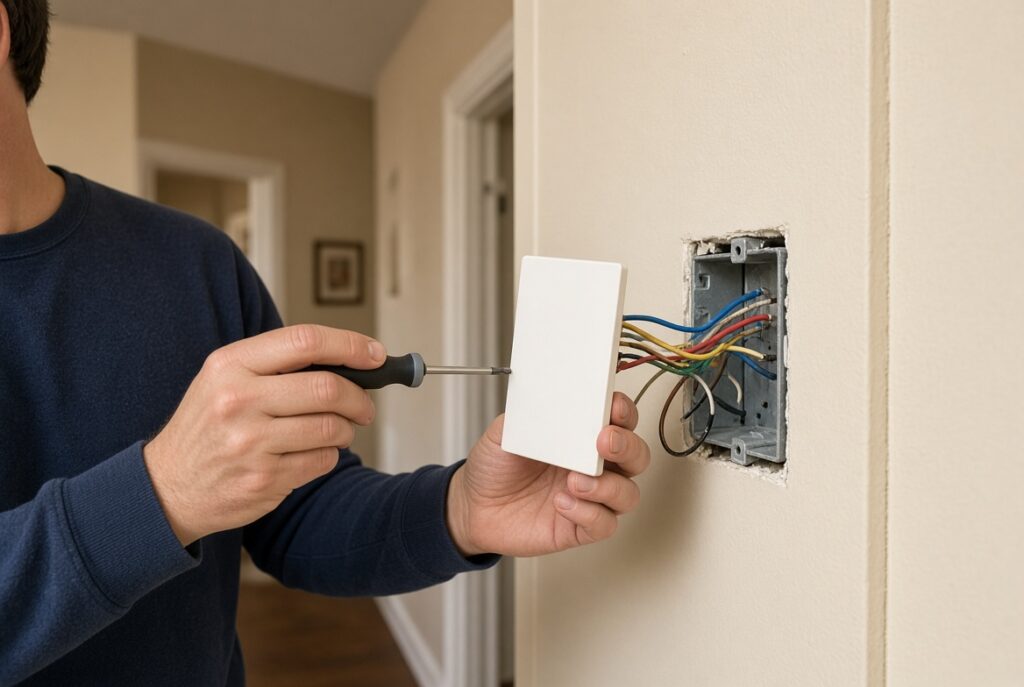
- Gather Essential Tools: Before starting the installation, make sure you have all the necessary tools at hand. You’ll need a screwdriver, wire cutter/stripper, and possibly a drill depending on your setup.
- Turn Off Power: As a safety measure, turn off the power to your HVAC system at the breaker box. This step is essential to prevent any electrical mishaps during the installation process.
- Identify Existing Wiring: Take note of the existing wiring in your thermostat setup. Different smart thermostats may require specific wiring configurations, so understanding your current setup is vital.
- Check Compatibility: Verify that your smart thermostat is compatible with your HVAC system. Refer to the manufacturer’s guidelines to ensure a seamless integration.
- Locate the C-Wire: The C-wire, or common wire, is crucial for providing continuous power to your smart thermostat. If your current setup lacks a C-wire, consider using a power extender kit to ensure proper functionality.
- Connect the Wires: Follow the manufacturer’s instructions to connect the wires from your HVAC system to the smart thermostat. Take care to match the wires correctly to avoid any issues later on.
- Mount the Thermostat: Securely mount the smart thermostat on the wall at a suitable location. Make sure it’s easily accessible for programming and adjustment.
- Power Up the System: Once the wiring is complete, restore power to your HVAC system at the breaker box. Your smart thermostat should now power up and be ready for setup.
- Complete Setup: Follow the on-screen instructions to complete the initial setup of your smart thermostat. This may involve connecting it to your Wi-Fi network and customizing settings to suit your preferences.
- Test the System: After setup, test the functionality of your smart thermostat to ensure it’s working correctly. Adjust the temperature remotely using the mobile app to see if the changes are reflected on your HVAC system.
By following these steps carefully, you’ll be able to successfully install your smart thermostat and enjoy the convenience and energy savings it offers.
Setting Up and Programming
After successfully installing your smart thermostat, it’s time to set it up and program it for optimal functionality. Here’s how you can get started:
Connecting to Wi-Fi
To begin, you’ll need to connect your smart thermostat to your home Wi-Fi network. This step is crucial as it allows you to control your thermostat remotely via a mobile app or other smart devices. Most smart thermostats come with easy-to-follow instructions for connecting to Wi-Fi. Follow the prompts on the thermostat’s display or the manufacturer’s app to complete this process.
Creating a Schedule
One of the key benefits of a smart thermostat is the ability to create personalized heating and cooling schedules. Think about your daily routine and preferences. Do you prefer different temperatures at night compared to during the day? Create a schedule that aligns with your lifestyle to ensure comfort and energy savings.
Utilizing Advanced Features
Explore the advanced features offered by your smart thermostat, such as geofencing and learning capabilities. Geofencing technology uses your smartphone’s location to adjust the temperature based on whether you’re home or away. Take advantage of this feature to further optimize your energy usage.
Monitoring and Adjusting Settings
Regularly monitor your smart thermostat to track energy usage and savings. Make adjustments to your settings as needed to maximize efficiency. Some thermostats provide energy reports that give you insights into your HVAC system’s performance. Use this data to make informed decisions about your heating and cooling habits.
Integrating with Smart Home Devices
If you have other smart home devices, consider integrating your smart thermostat with them for seamless automation. For example, you can link your thermostat to smart lighting systems or voice assistants for enhanced control and convenience.
Setting Alerts and Notifications
Take advantage of the alert and notification features on your smart thermostat. Receive alerts for extreme temperatures, filter changes, or system malfunctions. These notifications can help you address issues promptly and ensure your HVAC system runs smoothly.
By following these steps and utilizing the features of your smart thermostat effectively, you can enjoy a comfortable home environment while optimizing energy usage. Make the most of your smart thermostat by customizing settings to suit your preferences and lifestyle.
Maintenance Tips
To keep your smart thermostat functioning optimally and extend its lifespan, follow these practical maintenance tips.
Regular Cleaning
Dust and debris can accumulate on your smart thermostat’s sensors and affect its performance. It’s essential to clean the device regularly to ensure accurate readings and efficient operation. Use a soft, dry cloth to gently wipe the thermostat’s surface and remove any dirt buildup.
System Updates
Manufacturers often release software updates for smart thermostats to improve functionality and address potential issues. To ensure your device is running the latest version, check for updates regularly through the companion mobile app or the manufacturer’s website. Updating the system promptly can enhance performance and security.
Battery Check
If your smart thermostat relies on batteries for power backup, it’s crucial to monitor the battery level periodically. Low batteries can disrupt the device’s operation or cause it to shut down unexpectedly. Replace the batteries as needed to prevent interruptions in service and maintain consistent functionality.
Calibration Verification
Calibrating your smart thermostat accurately is essential for precise temperature control and energy efficiency. To verify the calibration, you can use a separate thermometer placed near the device to compare temperature readings. If there are discrepancies, adjust the thermostat settings accordingly or consult the manufacturer for guidance.
Inspection of Connections
Periodically inspect the wiring connections of your smart thermostat to ensure they are secure and free of damage. Loose or damaged connections can lead to operational issues or malfunctions. If you notice any concerns with the wiring, contact a professional technician to address the issue promptly.
By following these maintenance tips, you’ll ensure that your smart thermostat continues to operate efficiently, providing you with optimal comfort and energy savings. Regular upkeep of your device can help avoid potential issues and maximize its capabilities for a seamless smart home experience.
Conclusion
You’re now equipped with the knowledge to make the most of your smart thermostat. Remember to choose one that fits your needs, set it up correctly, and utilize its features efficiently. Regular maintenance is key to ensuring your smart thermostat runs smoothly and helps you save energy. Enjoy the convenience and comfort that a smart thermostat brings to your home!
Frequently Asked Questions
Q: What are the benefits of upgrading to a smart thermostat?
A: Upgrading to a smart thermostat provides remote access, energy optimization, personalized scheduling, and integration with other smart home devices for enhanced comfort and energy efficiency.
Q: What features should I consider when selecting a smart thermostat?
A: Consider compatibility with existing systems, mobile app integration, learning capabilities, geofencing technology, energy reports, voice control compatibility, and integration with other smart home devices.
Q: How do I install a smart thermostat?
A: Install by gathering tools, checking compatibility, locating the C-wire, testing the system, and following manufacturer instructions for a successful setup.
Q: How do I set up and program my smart thermostat?
A: Set up by connecting to Wi-Fi, creating personalized schedules, utilizing advanced features like geofencing, monitoring energy usage, integrating with other smart home devices, and setting alerts for system maintenance.
Q: What are some maintenance tips for smart thermostats?
A: Perform regular cleaning, system updates, battery checks, calibration verification, and inspection of connections to ensure optimal performance and extend the device’s lifespan.
For the rest of this topic, start at the Smart Thermostats page, then read install steps, the C-wire, Wi-Fi needs.
