
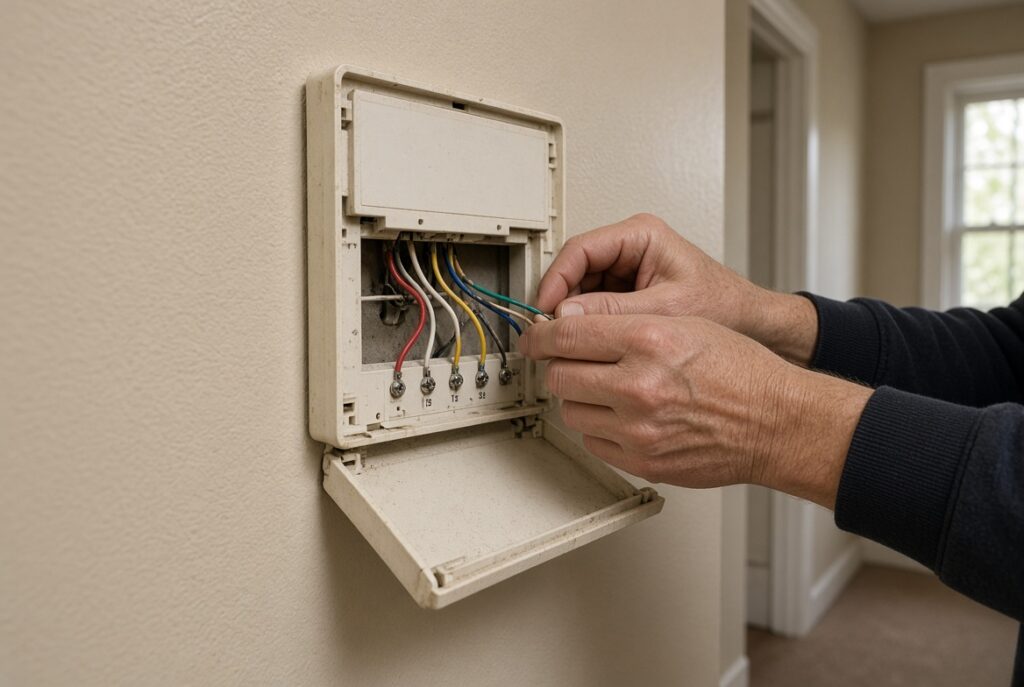
Ever wondered why your smart thermostat keeps losing power or won’t function properly? Picture this: you’re all set to enjoy a cozy evening at home, but your thermostat decides to act up, leaving you in the cold. Frustrating, right? That’s where the mysterious “C-wire” comes into play.
In this article, you’ll uncover the key to unlocking the full potential of your smart thermostat – the elusive C-wire. By understanding its importance, you’ll not only troubleshoot technical issues but also optimize your thermostat’s performance effortlessly. Stay tuned to learn how this small but mighty wire can make a big difference in your home comfort system.
Key Takeaways
- The C-wire, or “common wire,” is crucial for smart thermostat functionality, providing a continuous power supply for optimal performance.
- Having a C-wire connected ensures stable power, prevents malfunctions, and allows for advanced features like learning algorithms and energy-saving modes.
- You can check for a C-wire by inspecting your thermostat’s wiring, looking for a blue wire labeled “C,” or using a multimeter to test for voltage.
- If your setup lacks a C-wire, options include using a power extender kit, converting the G-wire, adding an external transformer, or seeking professional installation.
- Adding a C-wire to your smart thermostat involves assessing your wiring setup, confirming compatibility, obtaining necessary tools, securely installing the wire, testing the connection, and seeking professional help if needed.
Understanding the C-Wire for Smart Thermostats
Do you know what the C-wire is and why it’s crucial for your smart thermostat? Let’s dive into this essential component to better understand its role.
What is the C-Wire?
The C-wire, also known as the “common wire,” is a vital part of your smart thermostat setup. It provides a continuous flow of 24-volt power to your thermostat, enabling it to operate properly. Without this constant power supply, your smart thermostat may not function optimally.
Why is the C-Wire Important?
The C-wire plays a key role in maintaining the power supply to your smart thermostat, ensuring consistent performance and functionality. It prevents issues like the thermostat constantly resetting, power cycling, or not turning on at all. By having a C-wire properly connected, you avoid potential problems and enjoy a seamless experience with your smart device.
How to Check for a C-Wire
Not sure if you have a C-wire connected to your thermostat? You can easily check by removing the thermostat cover and inspecting the wiring. The C-wire is usually labeled “C” and is typically blue in color. If you don’t see a C-wire, you may need professional help to install one for optimal thermostat operation.
Adding a C-Wire
If your thermostat requires a C-wire but your current setup lacks one, you have a few options. You can hire a professional to install a C-wire, use an adapter that creates a virtual C-wire, or choose a smart thermostat model that doesn’t require a C-wire.
Benefits of Having a C-Wire
Having a C-wire connected to your smart thermostat ensures reliable power and consistent performance. It stabilizes the system, prevents potential malfunctions, and allows your thermostat to operate efficiently, providing precise temperature control and advanced features without interruptions.
Understanding the importance of the C-wire for smart thermostats gives you the knowledge you need to optimize your device’s performance and enjoy a comfortable home environment.
Importance of the C-Wire in Smart Thermostat Installation
Having understood the critical role of the C-wire in smart thermostat functionality, let’s delve into why it is indispensable for your smart thermostat installation.
Stabilizes Power Supply
The C-wire, or “common wire,” provides a dedicated power supply to your smart thermostat, ensuring continuous and stable electricity flow. Without this constant power supply, your thermostat may encounter issues like sporadic shutdowns or the inability to maintain settings correctly.
Enhances Performance
By connecting a C-wire, you equip your smart thermostat with the necessary power to function optimally. This enhanced power supply allows the thermostat to operate smoothly, communicate effectively with your HVAC system, and regulate indoor temperatures with precision.
Enables Advanced Features
Incorporating a C-wire not only improves the basic functions of your smart thermostat but also unlocks advanced features that require a consistent power source. These features may include learning algorithms, geofencing capabilities, humidity control, and energy-saving modes, all of which contribute to a more efficient and comfortable home environment.
Facilitates Compatibility
A C-wire ensures compatibility with a wide range of smart thermostats, preventing any limitations in device selection based on power requirements. It enables you to choose the model that best suits your needs and seamlessly integrates with your existing heating and cooling system.
Supports Long-Term Reliability
With a C-wire in place, you safeguard your smart thermostat against fluctuations in power that can lead to malfunctions or premature device failure. The consistent power supply provided by the C-wire fosters long-term reliability, reducing the likelihood of technical issues and ensuring sustained performance.
Conclusion
Understanding the importance of the C-wire in smart thermostat installation is key to maximizing the functionality and longevity of your device. By ensuring a stable power supply, enhancing performance, enabling advanced features, promoting compatibility, and bolstering long-term reliability, the C-wire plays a vital role in optimizing your smart home experience.
How to Identify If You Have a C-Wire
To confirm if your thermostat setup includes a C-wire, follow these simple steps:
- Inspect Your Current Thermostat:
Check if there is an unused wire in your thermostat’s wiring bundle. The C-wire is typically blue, but it can be another color. Look for a wire that isn’t connected to your current thermostat. - Refer to Your HVAC System:
Locate the control board of your heating and cooling system. Look for the terminal labeled “C” where all the wires connect. If there’s a wire attached to the “C” terminal, you have a C-wire. - Use a Multimeter:
If you’re still unsure, you can use a multimeter to test for the presence of a C-wire. Set the multimeter to measure voltage and touch one probe to the “C” terminal on the control board and the other probe to the “R” terminal. If you get a voltage reading (usually between 24-30 volts), it means you have a C-wire. - Consult Your HVAC Professional:
If you’re unable to identify the C-wire or need assistance, it’s best to seek help from an HVAC professional. They can accurately determine if you have a C-wire and provide guidance on what steps to take next.
By following these steps, you can easily determine whether your current thermostat setup includes a C-wire. Identifying the presence of a C-wire is crucial for optimizing the functionality of your smart thermostat and ensuring a stable and efficient heating and cooling system.
Options for Homes Without a C-Wire
If your home lacks a C-wire, worry not; there are several solutions to enable the successful installation of a smart thermostat.
Power Extender Kit
Consider using a power extender kit. This accessory acts as a virtual C-wire by drawing power from the furnace’s control board. It provides the additional power needed for your smart thermostat without requiring the installation of a physical C-wire.
G-Wire Conversion
In some cases, the G-wire from your HVAC system can be repurposed to function as a C-wire. This process involves adjusting the wiring configuration at both the thermostat and the control board to transform the G-wire into a compatible power source.
Adding a Transformer
Another option is to install an external transformer. By connecting the transformer to the HVAC system, you can create a dedicated power source for your smart thermostat. This solution ensures a continuous power supply without the necessity of a C-wire.
Professional Installation
When in doubt or if these DIY options seem daunting, it’s advisable to seek professional assistance. HVAC technicians have the expertise to evaluate your system and implement the most suitable solution for integrating a smart thermostat without a C-wire.
Battery-Operated Thermostat
In cases where adding a C-wire is not feasible, opting for a battery-operated thermostat is a viable alternative. While these thermostats may have limitations compared to their wired counterparts, they can still offer smart features without the need for a C-wire.
Ensuring your smart thermostat has the necessary power supply is vital for its optimal performance. Explore these options to overcome the absence of a C-wire and enjoy the convenience and efficiency of a smart HVAC system in your home.
Installation Guide for Adding a C-Wire
To ensure a smooth and efficient installation process for adding a C-wire to your smart thermostat, follow these practical steps:
1. Assess Your Current Wiring Setup
Begin by turning off the power to your HVAC system to avoid any electrical mishaps. Once done, open up your thermostat and HVAC system to inspect the wiring. Look for the absence of a C-wire or if there is an extra wire that can be repurposed as the C-wire.
2. Determine Compatibility and Requirements
Check the specifications of your smart thermostat model to confirm if it requires a C-wire for proper functioning. Some smart thermostats may work without a C-wire, but having one ensures a stable power supply.
3. Obtain Necessary Tools and Equipment
Before proceeding, gather all the tools required for installation, including wire strippers, screwdrivers, electrical tape, and, if needed, a power extender kit. Ensuring you have everything at hand will streamline the process.
4. Install the C-Wire
If you’ve identified the wire to repurpose as the C-wire or have decided to use a power extender kit, carefully follow the manufacturer’s instructions. Connect the C-wire securely to both the thermostat and HVAC system, ensuring a snug fit.
5. Test the Connection
After completing the installation, turn the power back on and test the thermostat to check if it’s receiving power through the C-wire. Make any necessary adjustments or corrections to ensure a stable connection.
6. Seek Professional Help if Needed
If you are unsure about the installation process or encounter difficulties, it’s advisable to seek professional assistance. An HVAC technician or electrician can ensure the C-wire is properly integrated for optimal performance.
By following these steps, you can successfully add a C-wire to your smart thermostat, enabling continuous power supply and improving the efficiency of your heating and cooling system.
Conclusion
Ensuring your smart thermostat has a C-wire is crucial for its performance. By following the steps outlined in this guide, you can confidently add a C-wire to your system. This simple upgrade will provide consistent power, optimizing your thermostat’s functionality. Don’t hesitate to take the necessary steps to enhance your heating and cooling experience. With a C-wire in place, you’ll enjoy uninterrupted power and improved efficiency in managing your home’s temperature.
Frequently Asked Questions
What is a C-wire in a smart thermostat installation?
A C-wire, or common wire, is an essential component for providing continuous power to your smart thermostat. It ensures stable and reliable operation by completing the circuit and avoiding power shortages.
How can I check if my home has a C-wire?
To determine if your home has a C-wire, inspect your thermostat wiring setup. Look for a wire connected to the “C” terminal on your thermostat or HVAC system. If unsure, consult the thermostat manual or seek professional assistance.
What should I do if my home lacks a C-wire?
If your home lacks a C-wire, consider using alternative power sources like a power extender kit or rewiring your HVAC system to include a C-wire. These solutions can enable proper smart thermostat functionality.
How do I add a C-wire to my smart thermostat?
To add a C-wire, assess your current wiring, check thermostat compatibility, gather necessary tools like a multimeter and wire strippers, follow installation steps carefully, test the connection for proper functioning, and reach out to a professional if needed for guidance.
Why is adding a C-wire important for smart thermostat users?
Adding a C-wire is crucial for smart thermostat users as it guarantees uninterrupted power supply, enhances device performance, and optimizes heating and cooling system efficiency. It ensures that your smart thermostat functions reliably and efficiently in the long run.
For the rest of this topic, start at the Smart Thermostats page, then read install steps, what you need, Wi-Fi needs.
