
Ever found yourself struggling to reset your smart camera bird feeder after a glitch? Imagine missing out on capturing those delightful bird moments because your feeder isn’t cooperating. Fret not, as we’ve got you covered with a simple solution to get your smart camera bird feeder back on track.
In this article, you’ll discover easy steps to reset your smart camera bird feeder hassle-free. Say goodbye to technical troubles and hello to uninterrupted bird-watching enjoyment. By following our guide, you’ll be back to capturing stunning avian visitors in no time. Let’s dive in and ensure your smart camera bird feeder is up and running smoothly for your viewing pleasure.
Key Takeaways
- Smart camera bird feeders combine technology and nature, offering live-streaming and monitoring capabilities for bird watching.
- Resetting a smart camera bird feeder can resolve technical issues; locate the reset button on the feeder or in the app settings.
- Troubleshooting tips include checking Wi-Fi connectivity, updating firmware, and ensuring proper power supply.
- Follow steps like powering off/on, resetting Wi-Fi connection, factory reset, and checking for firmware updates to reset the bird feeder efficiently.
- To verify the reset, check the indicator lights, Wi-Fi connection, camera features, and app performance.
- In case of persistent issues, contact customer support with detailed information for further assistance.
Understanding the Smart Camera Bird Feeder
Let’s delve into the workings of your smart camera bird feeder to understand how to successfully reset it.
- Smart Technology Integration
- The smart camera bird feeder combines technology and nature, allowing you to observe birds with ease.
- Technology facilitates live-streaming and monitoring of bird activity in your yard.
- Connectivity Components
- Your smart camera bird feeder relies on Wi-Fi connectivity to transmit data.
- The feeder may have an app for remote access and control, enhancing your bird-watching experience.
- Resetting Procedure
- If your smart camera bird feeder experiences technical issues, a reset can often resolve them.
- To reset, locate the reset button on the feeder or in the app settings.
- Press the reset button for a few seconds until the lights flash or you receive a notification.
- Release the button and wait for the feeder to restart, indicating a successful reset.
- Troubleshooting Tips
- Ensure your feeder is properly connected to a stable Wi-Fi network.
- Update the feeder’s firmware to the latest version for optimal performance.
- Check the power source and ensure it’s functioning correctly.
- Post-Reset Considerations
- After resetting the feeder, reconfigure the settings as needed.
- Monitor the feeder for any recurrence of technical issues.
Understanding the technology behind your smart camera bird feeder empowers you to troubleshoot effectively and enjoy uninterrupted bird-watching moments.
Recommended Products

Advanced AI Identifies 10,000+ Bird Species - Harnessing advanced AI technology, the Harymor smart bird feeder recognizes over 10,000+ bird species. With a app subscription, you can access detailed information about each identified bird. Ideal for both beginners and seasoned birdwatchers, it is widely used for observing nature. Enjoy live viewing, turning every backyard visit into an engaging learning experience for all ages

Advanced AI Identify 10000+ Birds,Guiding You into the bird world: Our smart bird feeder with camera features bird AI recognition (Subscription Required; 30-Day Free Trial) that identifies and Popular Science you about over 10,000 bird species.Whether you are a novice or a bird watcher yourself, it can help you better know birds in nature

Live Birdwatching, Anytime, Anywhere: Watch birds visit your bird feeder with camera in real-time with 2K HD video streaming straight to your phone. Whether you’re at home or away, never miss a moment as birds stop by, bringing nature closer than ever. You can even use it as an additional security camera.
Steps to Reset the Smart Camera Bird Feeder
When it comes to resetting your smart camera bird feeder, follow these simple steps to troubleshoot any technical issues efficiently and get back to enjoying bird-watching in no time.
Recommended Products

BIRDFY SMART BIRD FEEDER DESIGNED FOR BEGINNERS. Since 2022, Birdfy has been a leading smart bird feeder brand, serving over 750,000 birdwatching enthusiasts worldwide. The 2025 Birdfy Rookie Series is made for beginners, combining FHD video, AI bird identification, full‑color night vision, and slow‑motion playback in a compact, lightweight, easy‑to‑install design—an ideal first bird feeder camera for any new birdwatcher.

3K HD & AI Bird Identification:Enjoy sharp 3K HD live streaming day and night to see intricate feather details. Equipped with advanced AI, bird feeders for outdoors identifies over 10,000 bird species(like bluebirds, hummingbirds, finch, etc.) and sends real-time alerts to your phone. Plus, you’ll get 30-day trial for AI recognition and cloud storage(Subscription auto-renews, and you can cancel anytime).

【AI Identification】When birds come to the bird camera, motion activated will auto capture, recording and store the video, built-in bird encyclopedia, further providing corresponding bird knowledge, with this information, you can provide their preferred feed.(unsubscribed can watch live streams, AI and Cloud needs subscription(new users get 30 days trail), monthly $1.99, you can use your own SD card, maximum 128GB)
1. Power Off and On
- Start by turning off your smart camera bird feeder. Locate the power button either on the feeder itself or the connected device.
- After powering off, wait for at least 30 seconds before turning it back on. This allows the system to reset properly.
2. Reset Wi-Fi Connection
- Access the settings menu on your smart camera bird feeder or the connected app.
- Find the Wi-Fi network settings and select “Forget Network” to erase the existing connection.
- Reconnect to your Wi-Fi network by entering the network name and password correctly.
3. Perform a Factory Reset
- If the issues persist, you may need to perform a factory reset. This will restore the smart camera bird feeder to its original settings.
- Look for the reset button on the feeder or in the user manual. Press and hold the button for 10-15 seconds until you see the device lights blinking or hear a reset confirmation.
4. Check for Firmware Updates
- It’s essential to ensure your smart camera bird feeder’s firmware is up to date to avoid technical glitches.
- Visit the manufacturer’s website or check the app for any available updates. Follow the prompts to install the latest firmware version.
- If despite following the above steps, your smart camera bird feeder still isn’t functioning correctly, reach out to customer support for further assistance.
- Provide details about the issue you’re facing, the troubleshooting steps you’ve taken, and any error messages displayed for a quicker resolution.
By following these straightforward steps, you can reset your smart camera bird feeder efficiently and resume enjoying uninterrupted bird-watching moments with ease.
Testing the Reset and Troubleshooting
To ensure that the reset process for your smart camera bird feeder is successful, testing the reset procedure and troubleshooting any potential issues afterward is crucial. Follow these steps to verify the reset and address common troubleshooting scenarios effectively.
Recommended Products

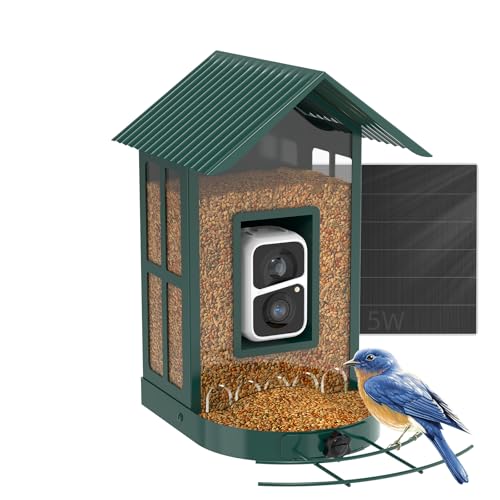
Solar Powered Bird Feeder with Camera - One full charge lasts for WEEKS with our 6W high-efficiency solar panel, even on cloudy days. Records 600+ 30-second 2K HD videos continuously. AI identifies 10,000+ bird species with real-time alerts. No more frequent charging, no more battery anxiety. Solution for backyard birdwatchers who want hassle-free, uninterrupted bird watching.

【Advanced AI Identify 10000+ Bird】Guiding You into the bird world,Our smart bird feeder with camera features bird AI recognition (Subscription Required,30-Day Trial Included) that identifies and Popular Science you about over 11,000 bird species. Whether you are a novice or a bird watcher yourself, it can help you better know birds in nature.
Instant Bird Arrival Alerts & Live Bird Watching Automatically captures photos and videos when birds visit. Receive real-time alerts with clear snapshot images through the Soliom Pro App, so you never miss a beautiful bird moment—even when you’re away
Verifying the Reset:
- Power On After Reset: After performing the reset, power on your smart camera bird feeder. The indicator lights should display the appropriate signals according to the user manual.
- Quality of Connection: Check the Wi-Fi connection of the bird feeder to ensure it’s stable. Access the camera feed on your connected device and monitor for any disruptions.
- Functionality Test: Test different features of the camera, such as recording, live streaming, and motion detection, to confirm that the reset hasn’t affected the functionality negatively.
- App Performance: Ensure the companion app is functioning correctly post-reset. Check for any lag or errors when accessing settings or live feeds.
- Connection Issues: If you encounter connectivity problems after the reset, try reconnecting to the Wi-Fi network. Check the network settings on both the bird feeder and your device.
- Missing Footage: In case recorded footage is missing post-reset, review the storage settings. Ensure there’s enough space on the SD card and that recordings are saving properly.
- Firmware Checks: Periodically check for firmware updates on both the camera and the app. Updated firmware often includes bug fixes that can address common issues.
- Contact Support: If you’ve followed all the steps and are still facing issues with your smart camera bird feeder, reach out to customer support. They can provide further assistance and troubleshoot specific problems.
By methodically testing the reset and promptly addressing any troubleshooting issues, you can ensure that your smart camera bird feeder functions optimally for uninterrupted bird-watching enjoyment.
Ensuring Proper Functionality Post-Reset
After successfully resetting your smart camera bird feeder, it’s essential to ensure that all functions are restored to their optimal state. Here’s what you need to do:
Check Verification of Reset:
Once you’ve completed the reset process, verify that the settings have been restored to default. Ensure that any customized configurations are reset as intended.
Confirm Connectivity:
Check the connection status of your smart camera bird feeder to the Wi-Fi network. Verify that the device is successfully connected to enable seamless operation.
Test Camera Features:
After the reset, test all camera features to guarantee they are working correctly. Check the live feed, motion detection, recording capabilities, and any other functions to ensure they operate without issues.
Assess App Performance:
Verify the performance of the app associated with your smart camera bird feeder. Ensure that you can smoothly access the camera feed, adjust settings, and receive notifications as expected.
Address Connection Issues:
If you encounter any connectivity issues post-reset, troubleshoot them promptly. Check the Wi-Fi signal strength, proximity to the router, and any potential interferences affecting the connection.
Manage Storage Settings:
Review the storage settings for recorded footage on your smart camera bird feeder. Ensure that the storage capacity is adequate, and the recordings are being saved correctly.
Check for Firmware Updates:
Regularly check for firmware updates for your smart camera bird feeder. Installing the latest firmware ensures optimal performance and may resolve any persisting issues post-reset.
Seek Customer Support:
If you encounter ongoing problems or difficulties with the functionality of your smart camera bird feeder post-reset, do not hesitate to contact customer support. They can provide further assistance and guidance to resolve any issues effectively.
By following these steps diligently post-reset, you can ensure that your smart camera bird feeder functions smoothly and enjoy uninterrupted bird-watching experiences.
Conclusion
Resetting your smart camera bird feeder is a quick and effective solution to tackle technical glitches and ensure uninterrupted bird-watching pleasure. By following the outlined steps diligently, you can maintain the optimal functionality of your device. Remember to verify the reset, check connectivity, test camera features, assess app performance, address connection issues, manage storage settings, and stay updated on firmware. If you encounter persistent issues, don’t hesitate to reach out to customer support for further assistance. With these proactive measures, you can enjoy seamless bird-watching experiences with your smart camera bird feeder.
Frequently Asked Questions
How can I resolve technical glitches in my smart camera bird feeder?
To resolve technical glitches in your smart camera bird feeder, you can perform a simple reset. Ensure the firmware is updated and contact customer support if issues persist.
What steps are involved in resetting a smart camera bird feeder?
When resetting a smart camera bird feeder, focus on checking the reset verification, confirming connectivity, testing camera features, assessing app performance, managing storage settings, checking for firmware updates, and seeking customer support in case of persistent issues.
Why is it essential to follow post-reset steps for optimal functionality?
It’s crucial to follow post-reset steps to ensure optimal functionality of your smart camera bird feeder. By diligently checking connectivity, testing features, and addressing any issues, you can enjoy uninterrupted bird-watching experiences.
