
Living rooms tend to feel awkward when the media wall crowds a corner or blocks natural light paths, which leaves seating options limited.
I noticed in my last place that shifting the entire setup to face the main seating area created more room to move and made the space feel less cramped right away.
Placement changes everything.
Once the wall works as a natural anchor instead of an obstacle, adding storage or simple shelving becomes much more straightforward.
A few of these approaches seem practical enough to adapt based on the size and shape of whatever room you have.
Build A Media Wall With Built-Ins

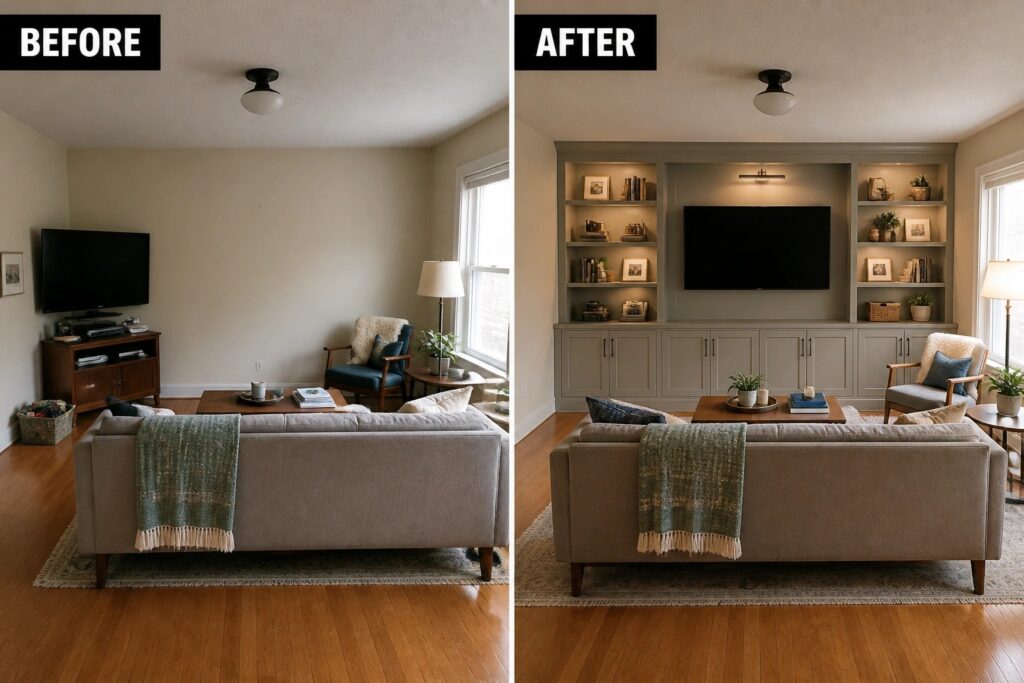
Adding built-ins around the TV turns a plain wall into the main feature of the room. The before setup had the screen sitting above a low console with nothing framing it, which left the space feeling unfinished. The after version brings the TV into a set of shelves and cabinets that match the wall color and add storage on both sides.
This approach works best in living rooms where the TV is used often and needs to feel intentional rather than added on later. Keep the scale realistic so the unit does not overpower the room, and match the cabinet color to the walls if you want the whole wall to read as one piece.
Streamline A Cluttered Media Wall
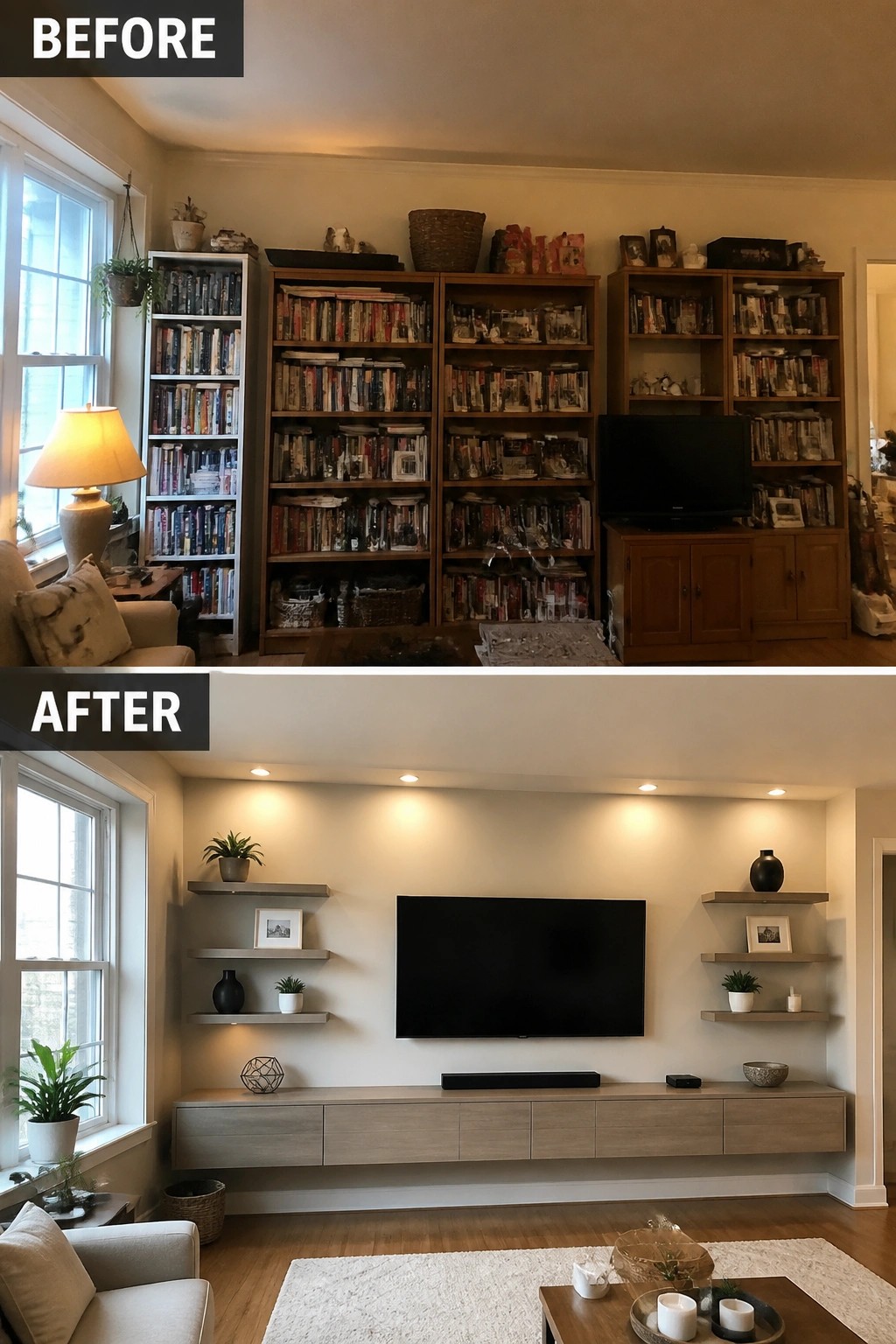
A wall packed with tall bookshelves can make a living room feel heavy and crowded. Replacing those units with a low console and a few floating shelves lets the television sit centered and at a comfortable height while keeping the wall open. The recessed lighting above adds a soft glow without needing extra lamps or fixtures.
This layout works best in rooms where you want to keep some display space but do not need floor-to-ceiling storage. Keep the number of shelves small, line them up evenly, and leave breathing room between objects. It suits homes that already have storage elsewhere and just need the media wall to feel calmer and easier to clean.
Make The Media Wall The Main Feature
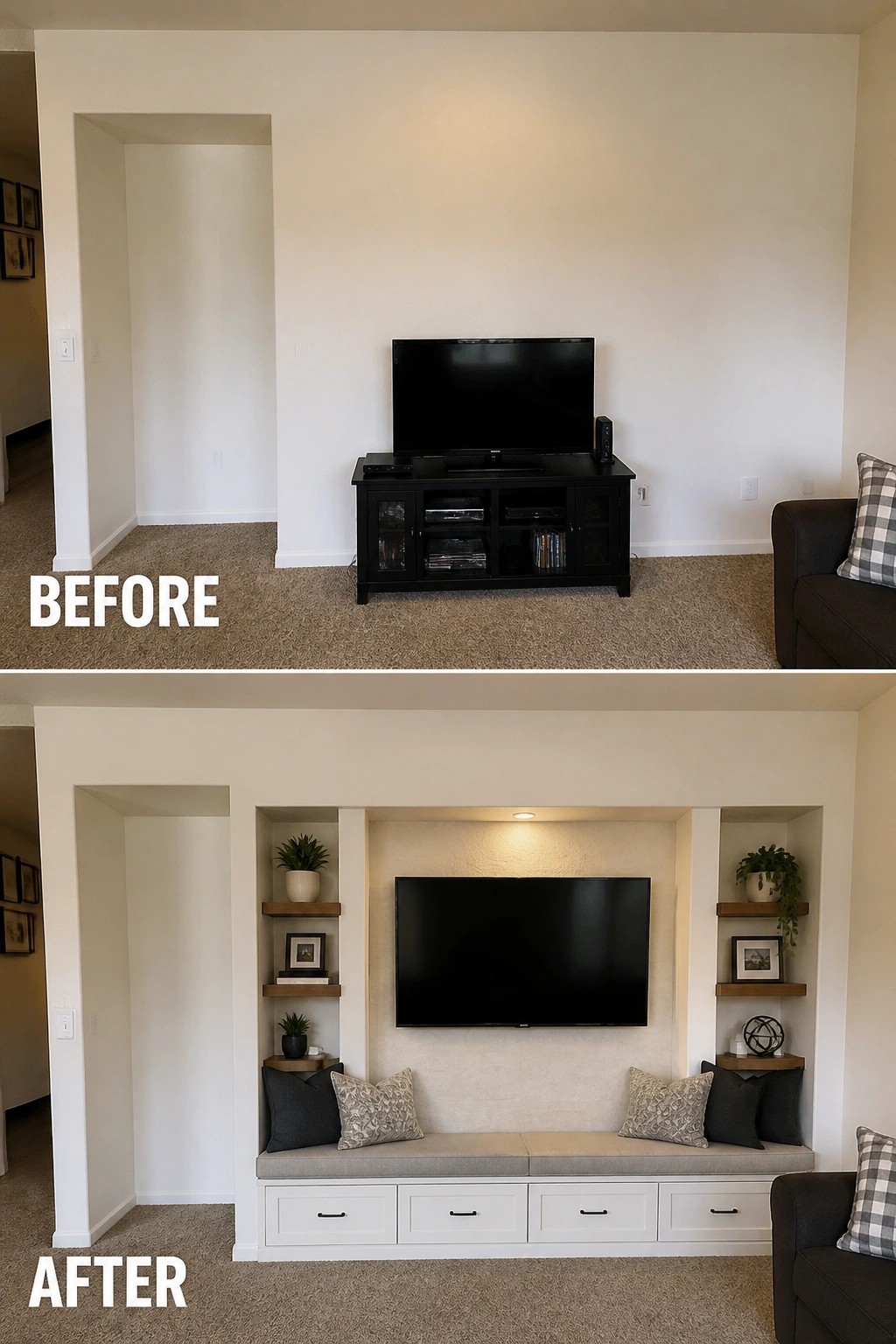
The main change here is replacing a freestanding TV stand with built-in shelves, a bench, and drawers that turn the wall into one solid unit. This gives the TV a clear place and adds storage without crowding the floor with extra pieces.
This idea works best in rooms that already have an open wall and need both display space and seating. Keep the built-ins simple and match the bench fabric to your other seating so the whole area feels connected rather than added on later.
Frame Your TV With Built-In Shelving And Cabinets
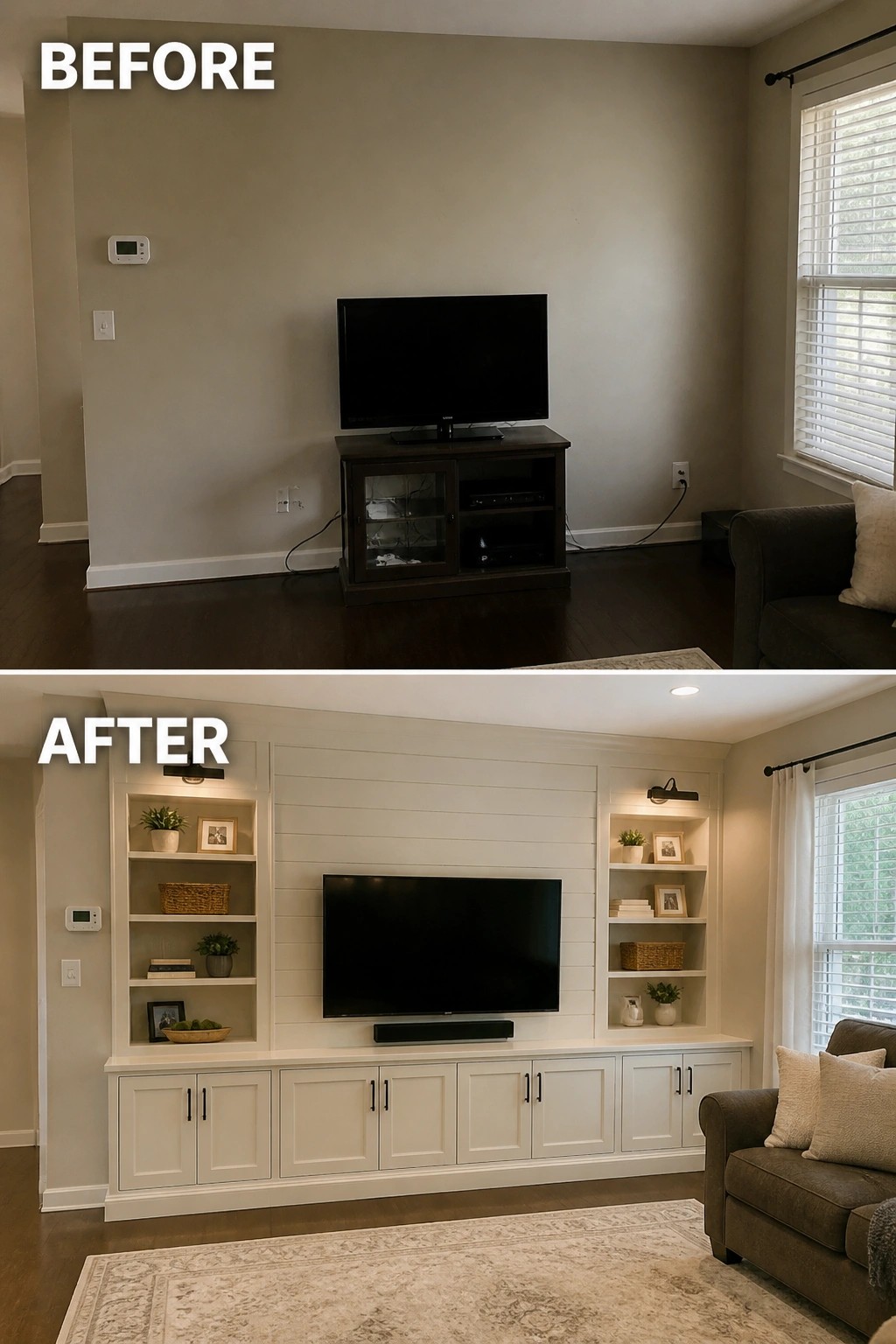
A plain wall with a TV sitting on a small stand often feels unfinished in a living room. Adding built-in shelves and cabinets on both sides turns the media area into a solid focal point while giving you useful storage without extra furniture cluttering the space.
This approach works well in rooms where the television needs to feel anchored rather than floating on the wall. Keep the built-ins simple in style and color so they blend with the room instead of competing with the screen. Measure your wall first and plan for the TV height so the shelves stay balanced on either side.
Center The TV To Balance The Media Wall
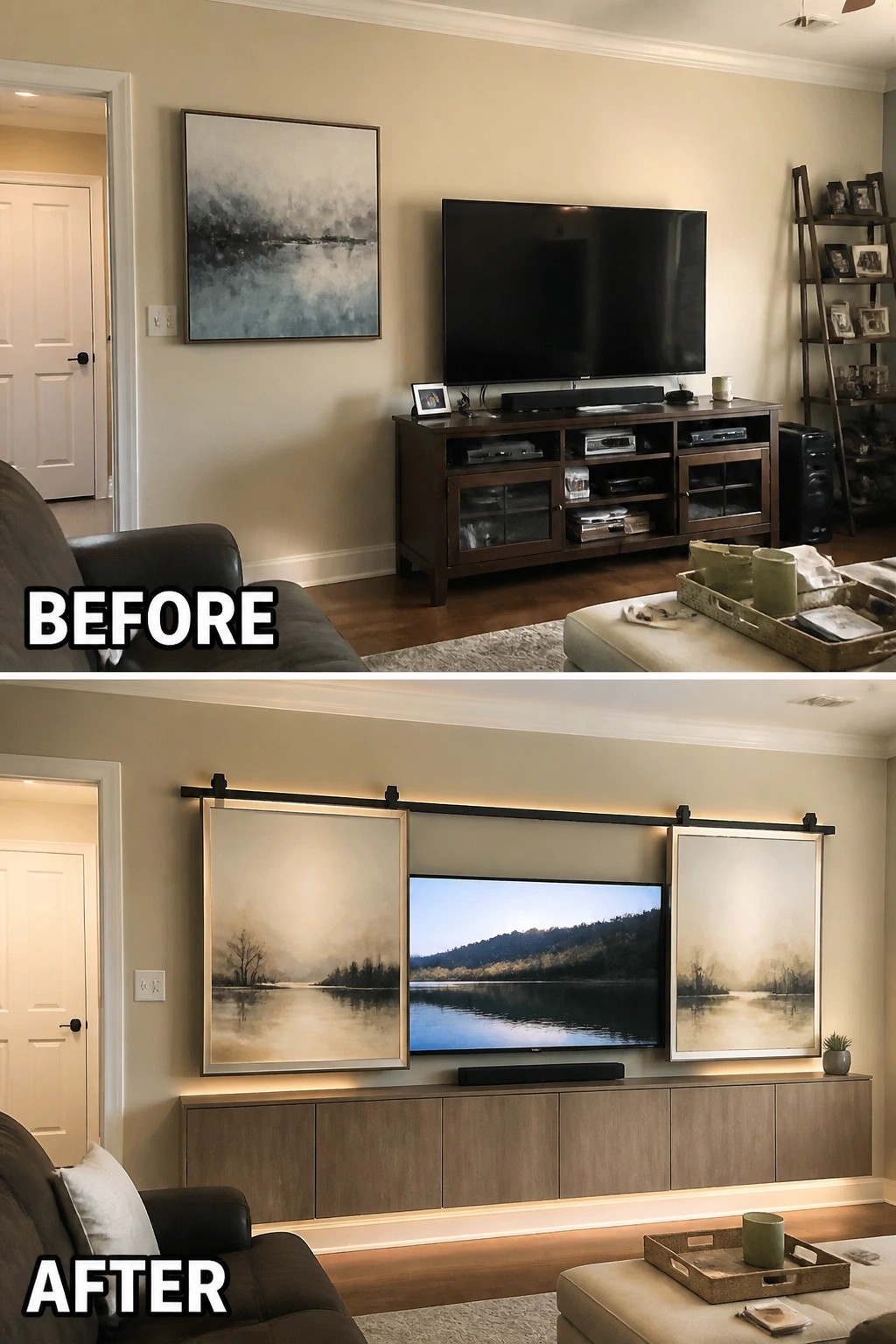
Moving the TV to the center of the wall and adding matching art on both sides turns a scattered setup into one clear focal point. The before version had the screen sitting off to the right with a single piece of art hanging alone, which made the whole area feel lopsided. Adding soft backlighting and a lower console underneath keeps the look clean without losing storage.
This approach works well in any living room where the TV needs to feel intentional rather than just placed wherever the outlets allow. Keep the art the same size and style on each side so the eye stays on the screen instead of jumping around the wall. Measure the full width first so the arrangement fits the space without crowding nearby doors or corners.
Make The Media Wall The Main Feature
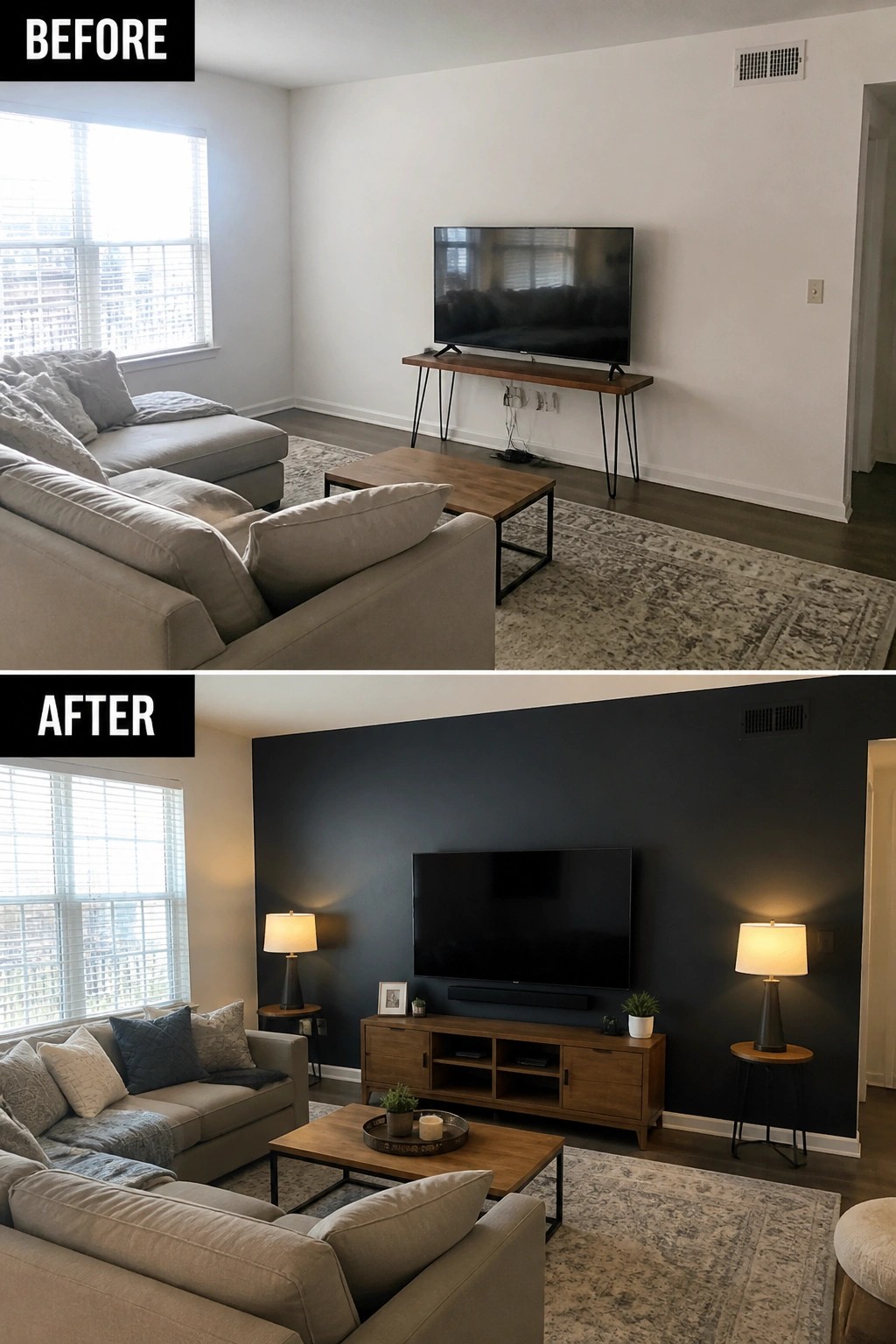
Painting the wall behind the TV and swapping the skinny console for a wider wood cabinet gives the screen a real place to land. The dark color pulls the eye straight to that end of the room and makes the whole seating area feel more settled instead of floating in a bright box.
This approach works best in living rooms that double as the main gathering spot. Pick a color that contrasts with the rest of the walls, keep the console at a scale that matches the TV, and add a pair of lamps so the area stays balanced at night.
Replace A Bulky Entertainment Center With Built-Ins
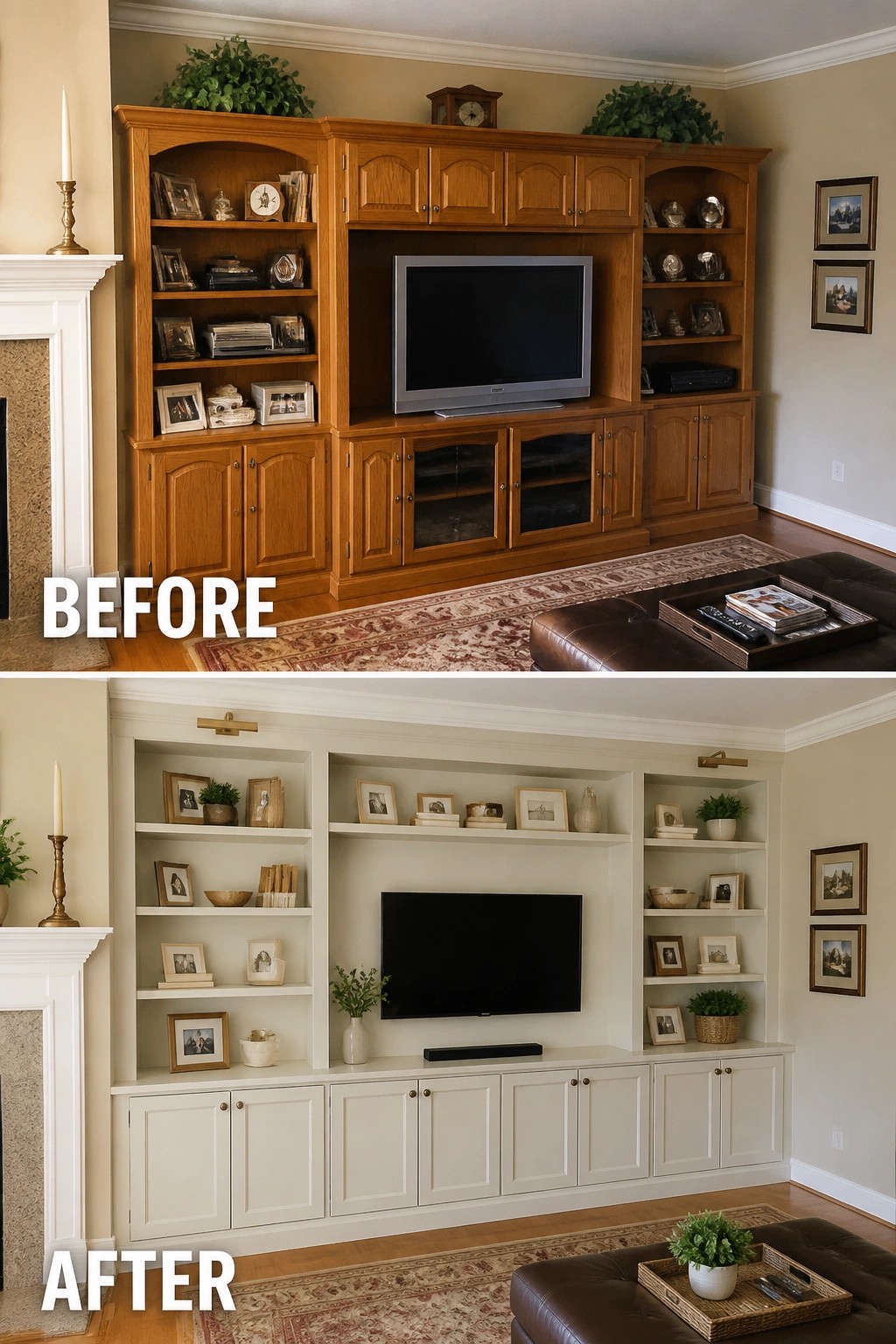
A heavy wooden entertainment center can make a living room feel closed in even when the rest of the space is open. Switching to built-in cabinetry below the TV and open shelves on the sides lightens the whole wall. The lower cabinets keep storage while the open shelves reduce the solid mass that used to dominate the room.
This approach works best in living rooms where the TV wall is the main focal point. Keep the cabinet color close to the wall so the unit recedes instead of standing out. Measure the depth of the new cabinetry carefully so it does not push the seating farther into the room than before.
Add Built-Ins To Frame The TV

A TV sitting on a standalone console often leaves the wall looking unfinished. Here the before version had the screen floating with only a couple of small frames for company. Adding white built-in cabinets below and open shelves on each side gives the TV a clear place and adds useful storage without crowding the room.
This works best in living rooms where the media area needs to feel like part of the architecture rather than just furniture pushed against a wall. Measure the full width first so the cabinets and shelves stay balanced around the screen. Keep the open shelves lightly styled so the TV remains the main point of interest.
Make The Media Wall The Focal Point

A plain wall with a floating TV often feels unfinished because nothing ties the screen into the rest of the room. In this case the fix was simple. Sliding barn doors were added on both sides of the TV and a low bench with storage was built underneath. The doors create a defined frame while the bench anchors the whole wall and hides clutter.
This approach works best in open living areas where the TV needs to feel intentional rather than just hung wherever the wires reach. Keep the doors on a simple track so they can slide open or closed depending on the day, and choose a bench height that matches nearby seating so the wall reads as part of the furniture layout instead of a separate feature.
Lower The TV And Anchor It With A Long Console

Many living rooms end up with the TV mounted too high and a small stand underneath that leaves the wall feeling unbalanced. Bringing the screen down to a more natural viewing height and replacing the narrow console with one long, low cabinet changes the whole proportion of the wall. The result feels calmer because the furniture now supports the TV instead of competing with it.
This approach works best in rooms where the TV needs to stay as the main focal point but should not overwhelm the space. Choose a console that spans most of the wall width and sits low enough to keep the screen centered at seated eye level. It also gives you room to hide components and add simple lighting or a few objects without creating visual clutter.
Mount The TV Lower For Better Viewing
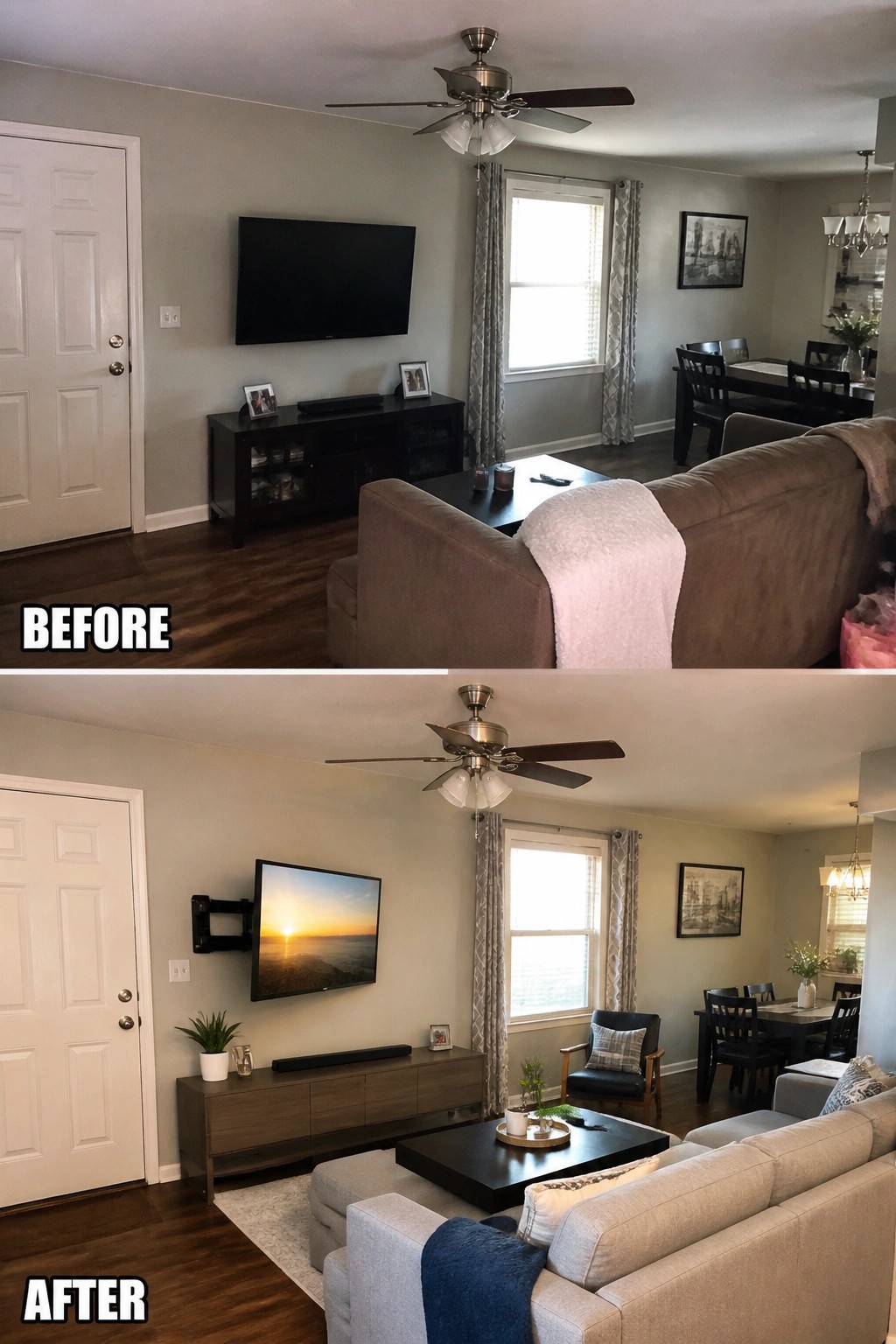
Moving the TV down to a lower wall mount changes how the whole room works. In the before photo the screen sat high above a dark console, which forced viewers to look up and made the space feel unbalanced. Dropping it to eye level with a swing arm and switching to a lighter console lets the seating face it naturally without straining necks or crowding the walkway.
This approach works well in any living room where the TV shares the main wall with windows or doors. Pick a mount that lets the screen tilt or swivel toward the main seating area, and keep the console narrow so it does not block the lower view. Measure from your usual seat height first, then test the angle before drilling.
Build A Media Wall Into The Fireplace Area
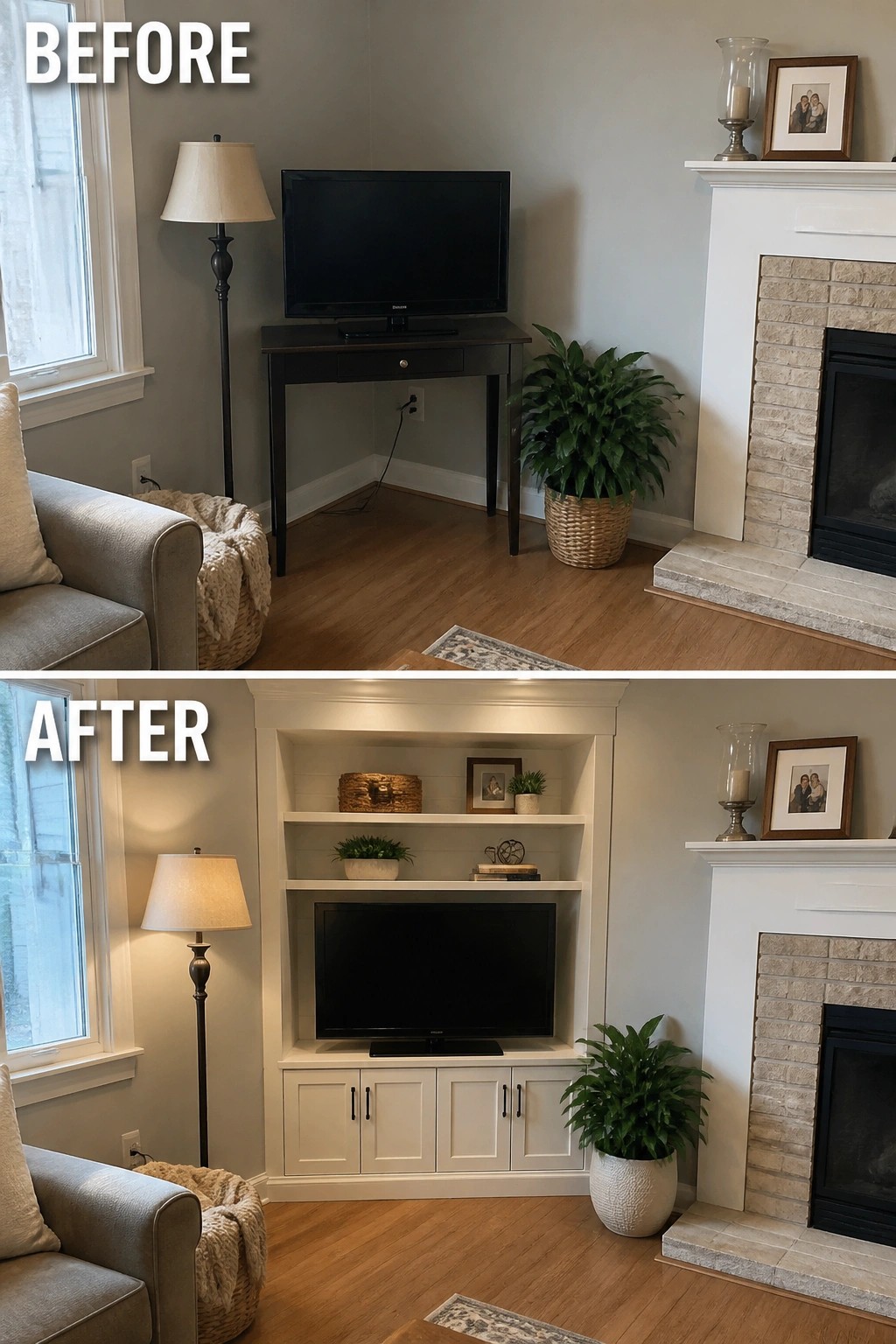
Placing the TV on a small standalone table next to the fireplace often leaves the wall looking scattered. Adding built-in shelves and cabinets around both the TV and the fireplace creates one clean focal point and makes the whole setup feel more intentional.
This idea works best in rooms where the TV and fireplace already share a wall. Keep the cabinet color simple so it blends with the trim, and use the shelves sparingly so the space stays balanced rather than crowded.
Add Shelving To Frame A Media Wall
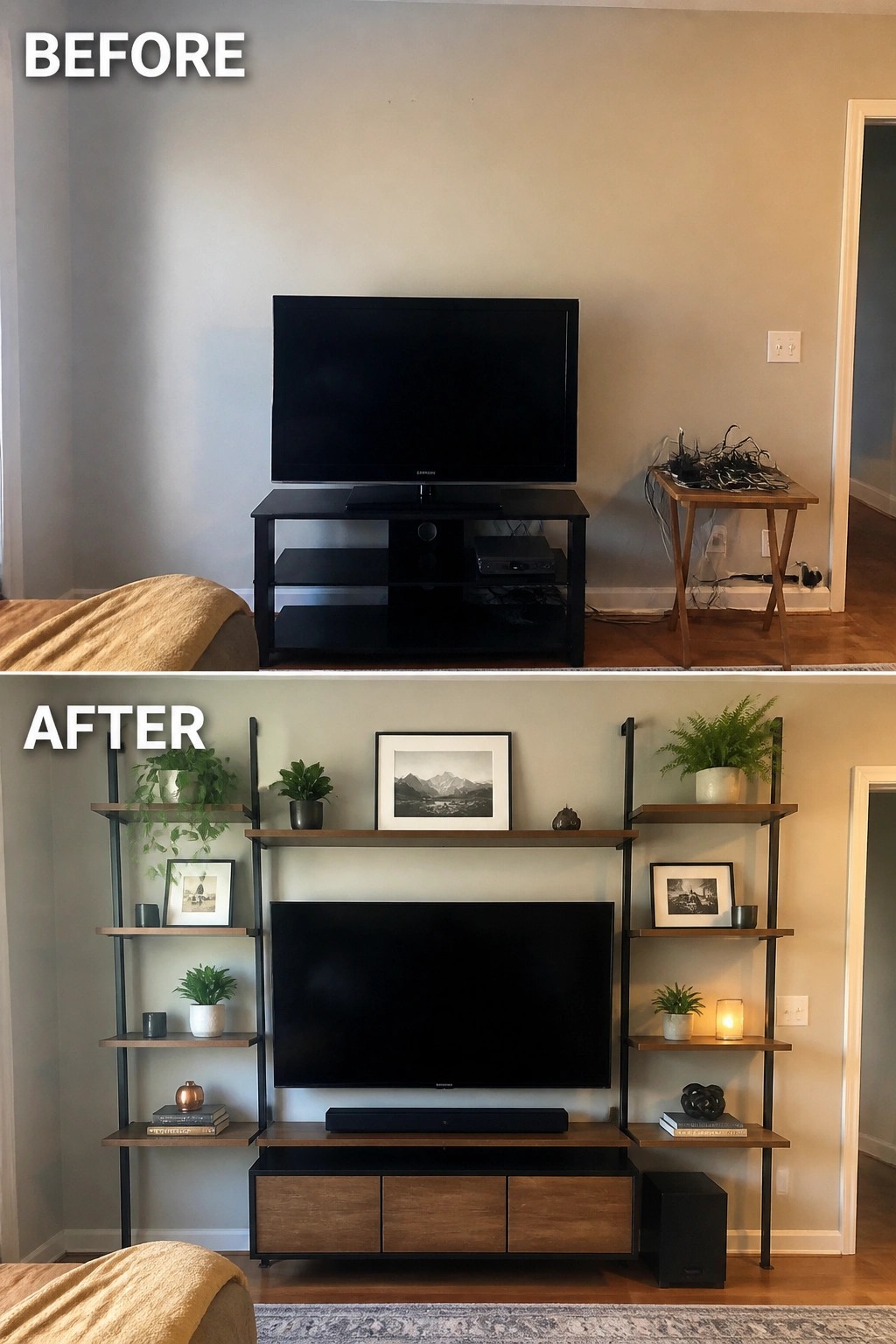
A standalone TV stand often leaves the wall feeling empty and the cables exposed. Adding a full shelving system around the TV pulls the whole area together and gives you storage and display space without needing built-in carpentry. The change turns a basic setup into the main feature of the room while keeping the layout simple and balanced.
This idea works well in living rooms where the television sits on a long wall and you want more function than a single cabinet can provide. Start by choosing a modular system that lets you adjust shelf heights, then place the TV at eye level and fill the side shelves gradually so the wall does not feel crowded. Keep the bottom storage closed if you want to hide devices and wires.
Lower The TV Onto A Media Console

Moving the TV down from a high wall mount to a low console changes how the whole room feels. The old setup left wires hanging and made the screen sit too high above the seating. Placing it on a long console with matching baskets hides the clutter and puts the screen at a comfortable viewing height.
This works best in rooms where the TV needs to share space with a fireplace or other features. Keep the console simple and use closed storage so everyday items stay out of sight. It suits family living rooms that want a calmer look without removing the screen.
Frame The TV With Built-In Cabinetry

A standalone TV on a slim console often leaves the wall looking bare and the room unfinished. Built-in cabinetry around the screen pulls the whole area together, adds storage, and turns the television into a deliberate focal point instead of a floating object.
This idea suits living rooms that open into hallways or need extra organization. Keep the cabinet depth modest so the unit does not take over the room, and match the finish to nearby trim for a cleaner result.
Frame The TV Wall With Vertical Panels
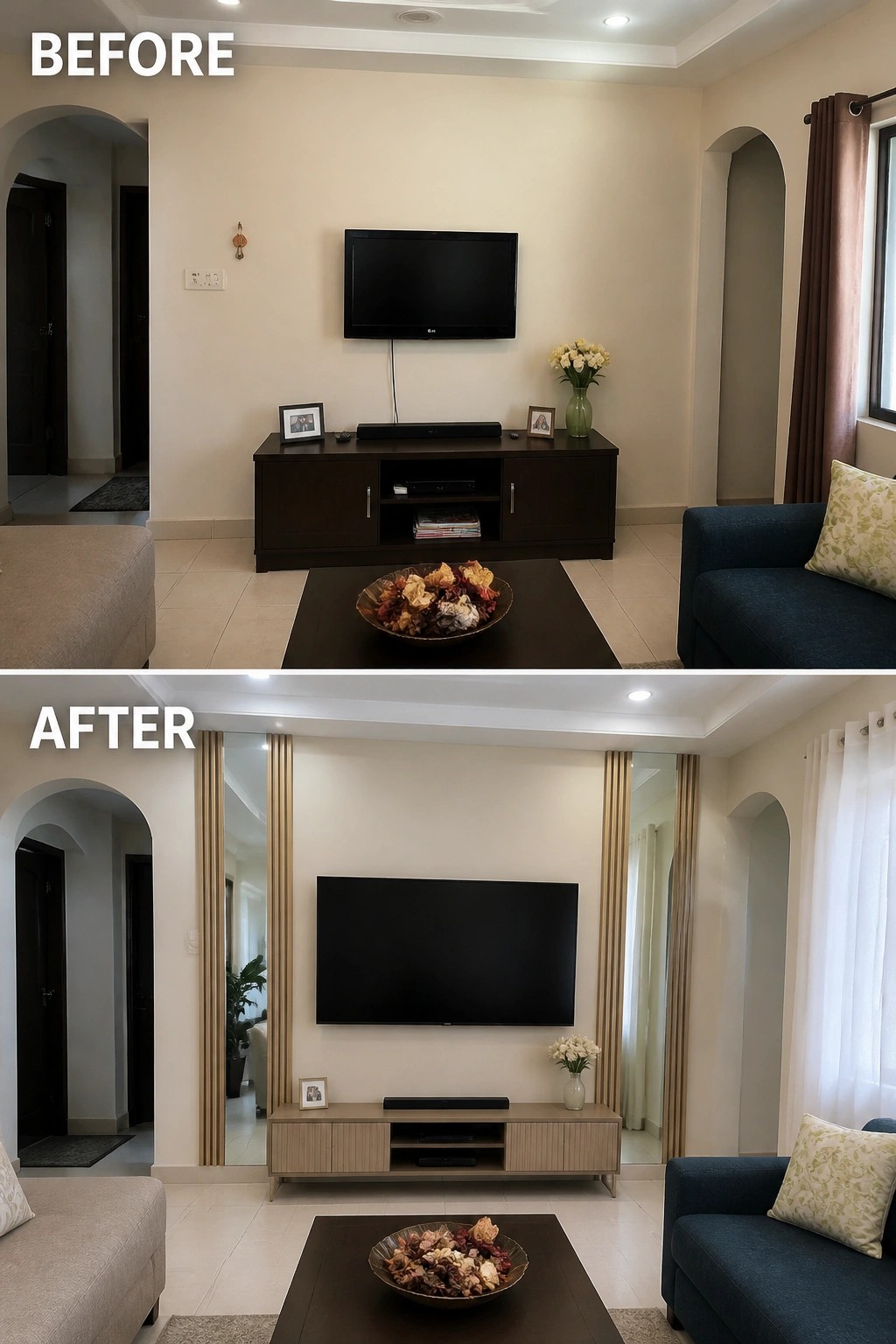
A plain wall with a TV mounted high often leaves the space feeling unfinished. Adding vertical wood panels on both sides creates a clear frame that pulls the whole media setup together and makes the television look like it belongs there instead of just hanging in the middle of nowhere.
This approach works best in living rooms where the TV needs to share the room with seating and traffic flow. Match the panel color to your console or trim so the new wall treatment feels like a natural extension rather than a separate feature. Start with the panels first, then adjust the console height if needed.
Make The Media Wall The Main Feature
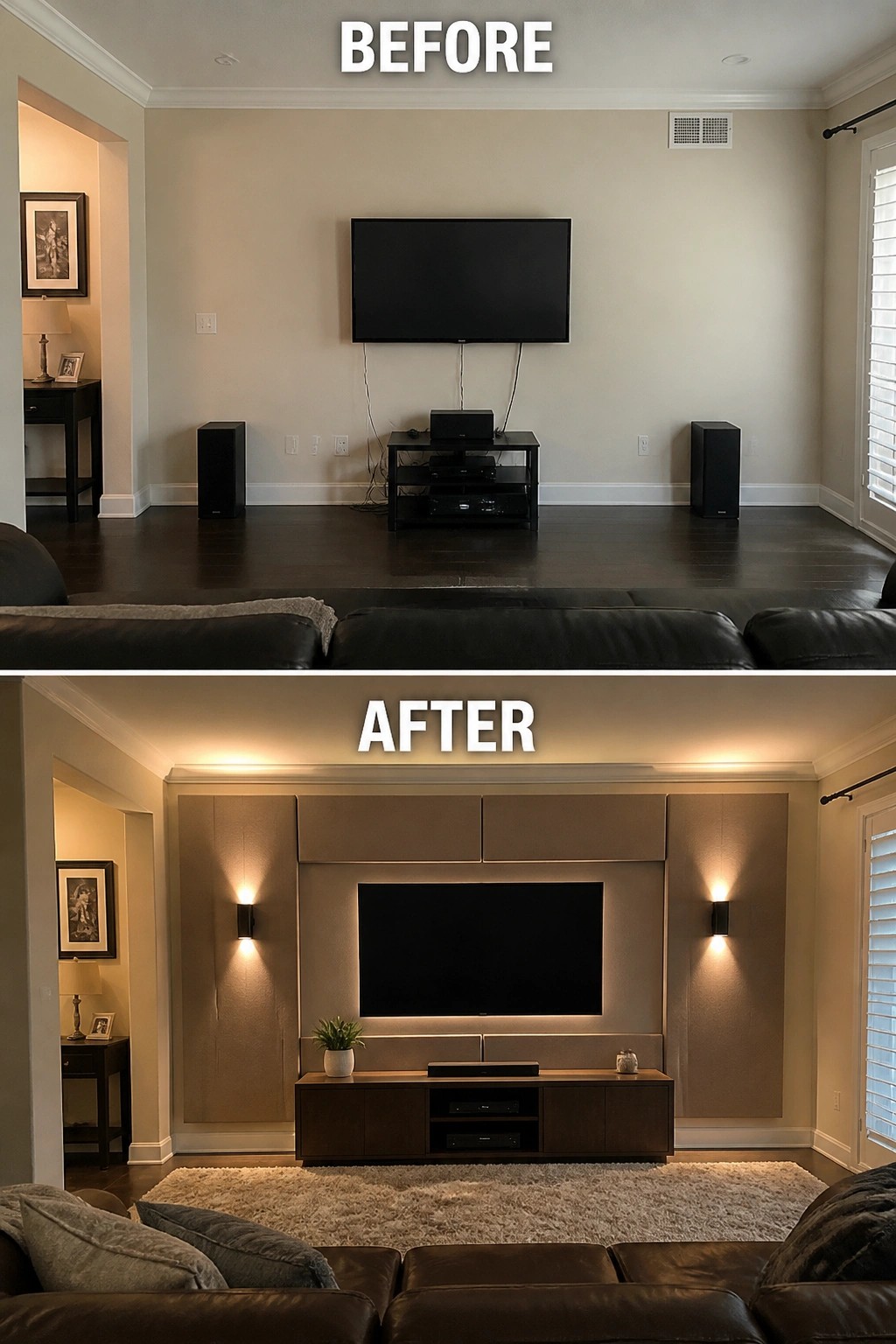
A plain wall with a mounted TV and visible wires often leaves the room feeling unfinished. Adding paneling around the TV, built-in lighting, and a low console underneath turns the setup into a clear focal point instead of just a screen on a blank surface.
This approach works well in living rooms where the TV is the main seating focus. Keep the paneling simple and match the console width to the TV so the whole wall feels balanced rather than oversized.
Move The TV To A Low Console For Better Flow
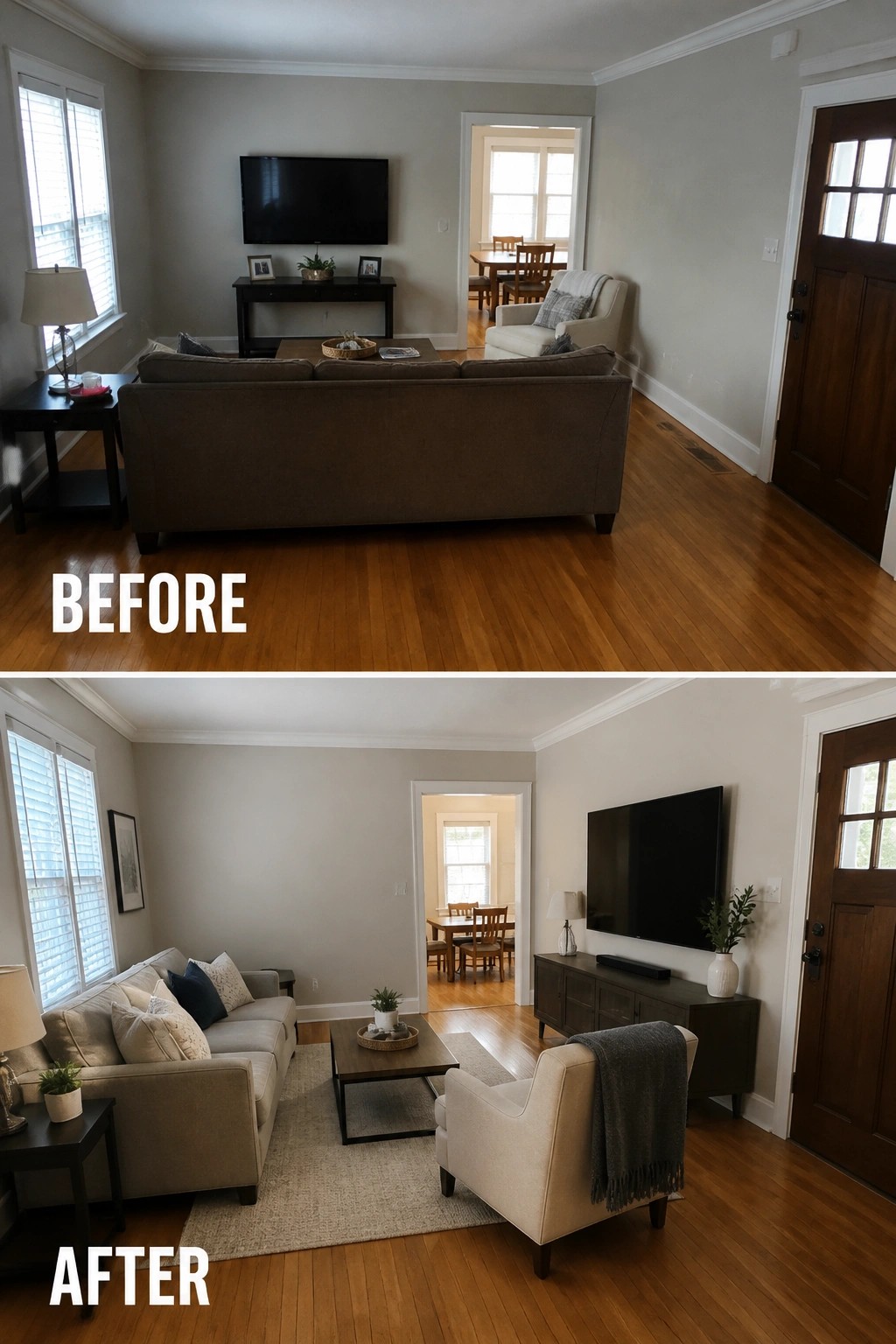
Many living rooms end up with the TV mounted too high because it feels like the easiest spot at first. Moving it down to a low media console on a side wall lets the seating face it at a natural height and stops the room from feeling split in two.
This change works best in rectangular spaces where the original placement leaves the sofa floating in the middle. Keep the console at seated eye level, add a rug to mark the seating zone, and make sure the new arrangement still leaves clear paths around the furniture.
Integrate The TV Into A Built-In Media Wall

A plain wall with a floating TV often leaves cables exposed and the screen feeling disconnected from the rest of the room. Adding a recessed media unit with lower cabinets, backlighting, and side panels gives the TV a clear place to sit and removes the visual mess at the same time.
This idea works best in living rooms where the TV is the main focal point but you want the wall to feel finished rather than temporary. Match the cabinet color to nearby trim or flooring so the unit blends in, and keep the lighting soft so it does not compete with the screen at night.
Make The Fireplace Wall The Main Feature
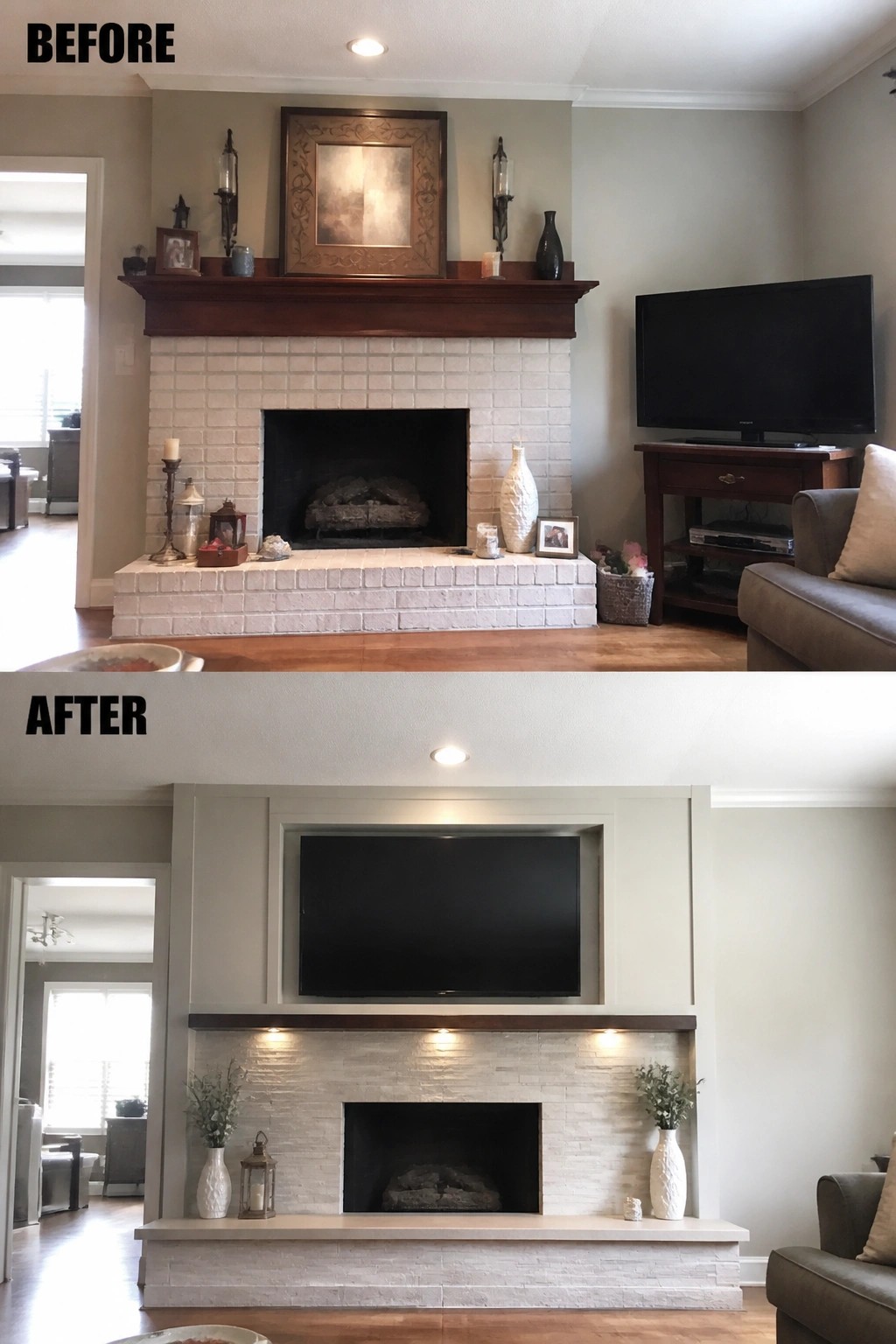
Many living rooms end up with the television off to one side and the fireplace left as a separate feature. Shifting the television above the fireplace pulls the whole wall into one focal point and makes the room feel more balanced.
This approach works best when the fireplace already sits in the center of the wall. Keep the mantel narrow and remove extra clutter so the screen stays the main element. Under-shelf lighting can help the firebox remain visible without competing with the television.
Make The Media Wall The Main Focal Point
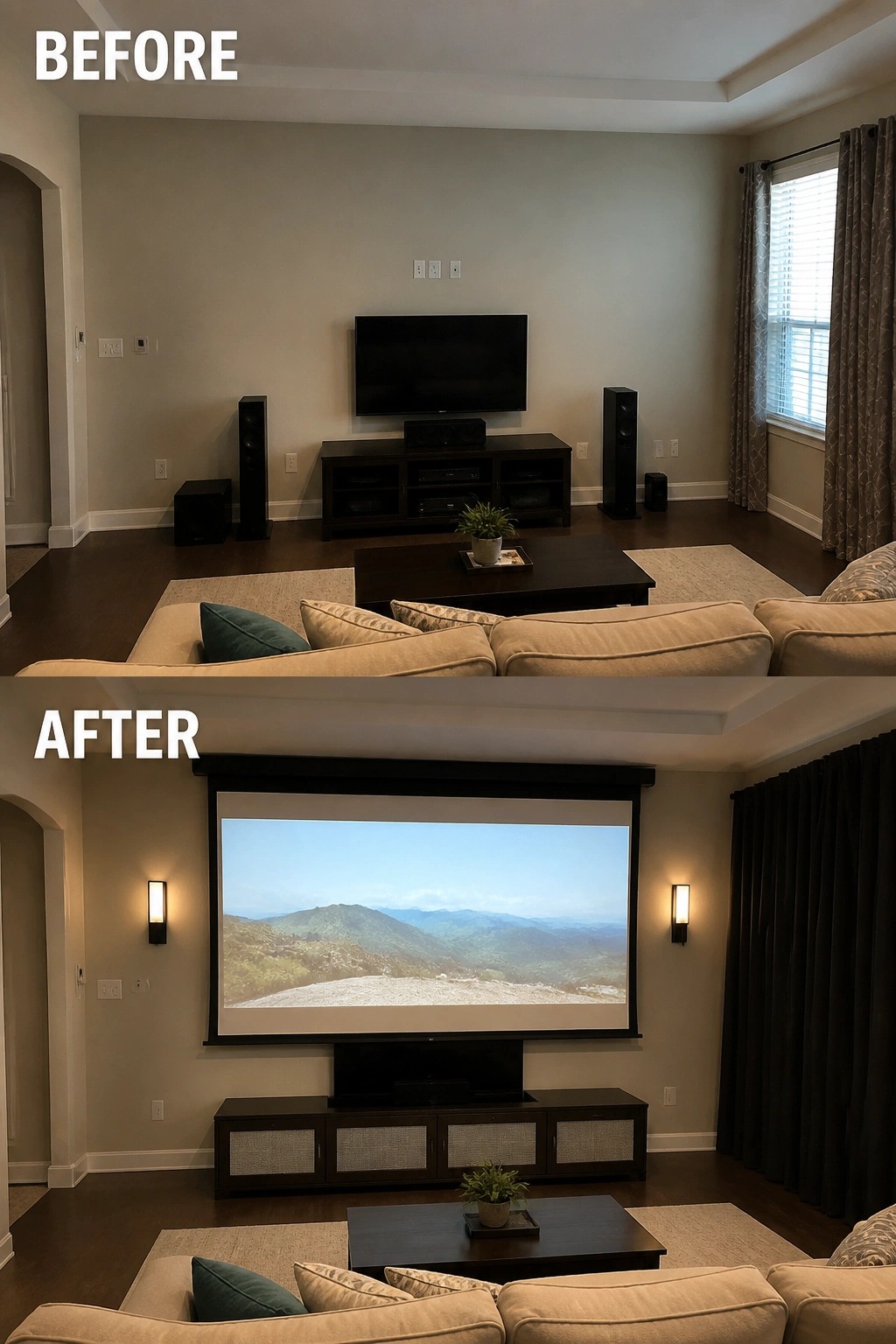
A plain wall with a floating TV often leaves the room feeling unfinished. In this case the owners replaced the high-mounted screen with a large drop-down projection screen centered above the console. The added wall sconces on either side give the wall a balanced look and create a clear viewing zone from the sofa.
This approach works best in rooms where the seating already faces one long wall. Keep the console low and simple so the screen stays the star. Add just enough lighting to frame the screen without competing with the picture. The result is a living room that feels planned rather than assembled around a single TV.
Make The Media Wall The Main Feature
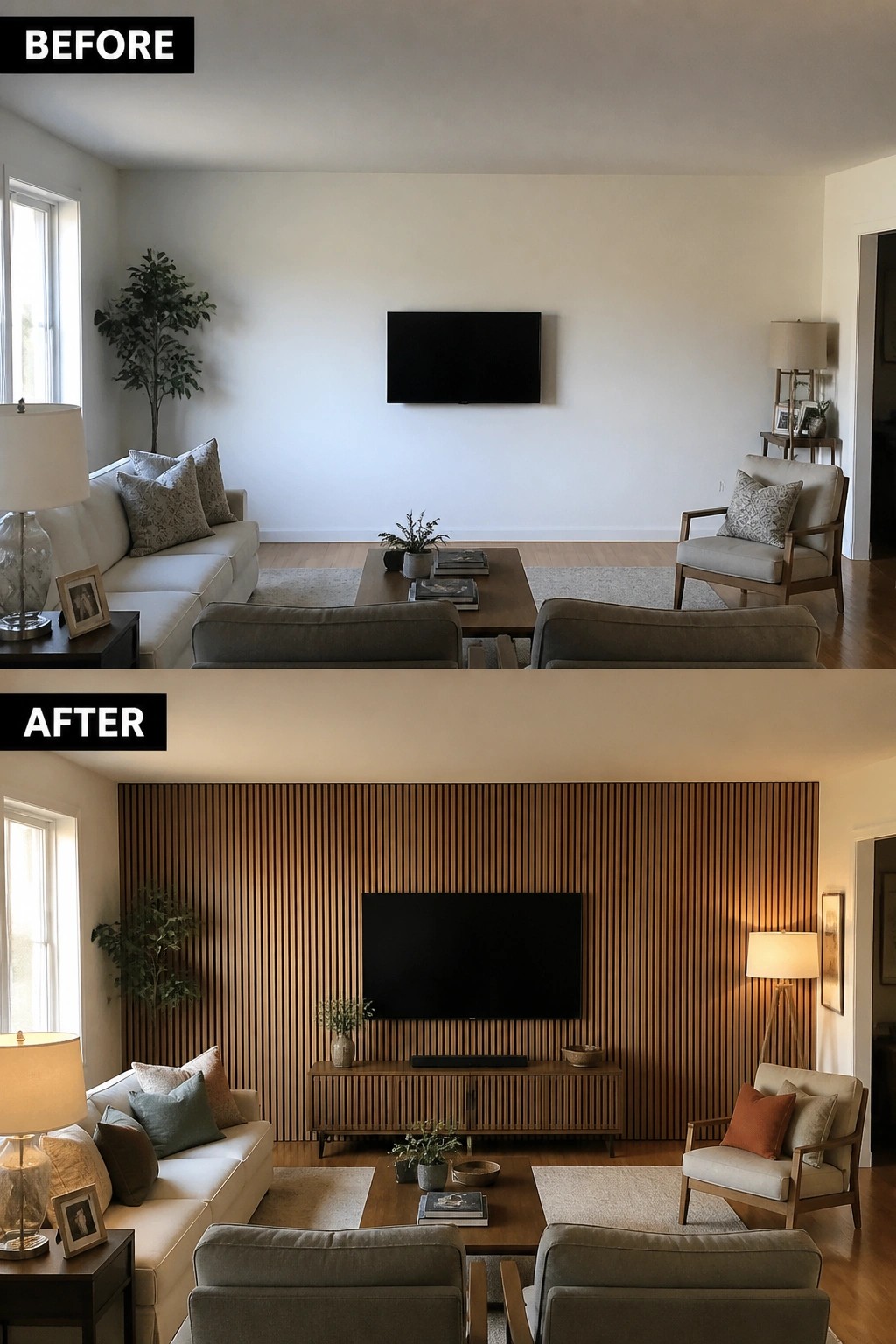
A blank wall behind the TV often leaves a room feeling unfinished. Adding a wood slat accent wall and a low console underneath gives the screen a solid backdrop and creates a clear focal point without extra clutter.
This idea works best in living rooms where seating faces the wall already. Choose a wood tone that matches your existing furniture, keep the console narrow so it does not crowd the space, and add just a few plants or lamps to finish the look.
Mount The Tv Above A Long Media Console

Many living rooms end up with the television sitting on a table and cords running along the wall. Mounting the TV higher and switching to a low console underneath removes the clutter and gives the wall a clear purpose. The console also hides the devices so the surface stays clean.
This setup works well in rooms where the TV needs to serve as the main focal point without looking temporary. Keep the console about the same width as the screen and add simple lamps on each end if the wall feels too bare. It suits most average living rooms where you want the media area to feel settled rather than thrown together.
Build Out A Media Wall With Built-In Shelves
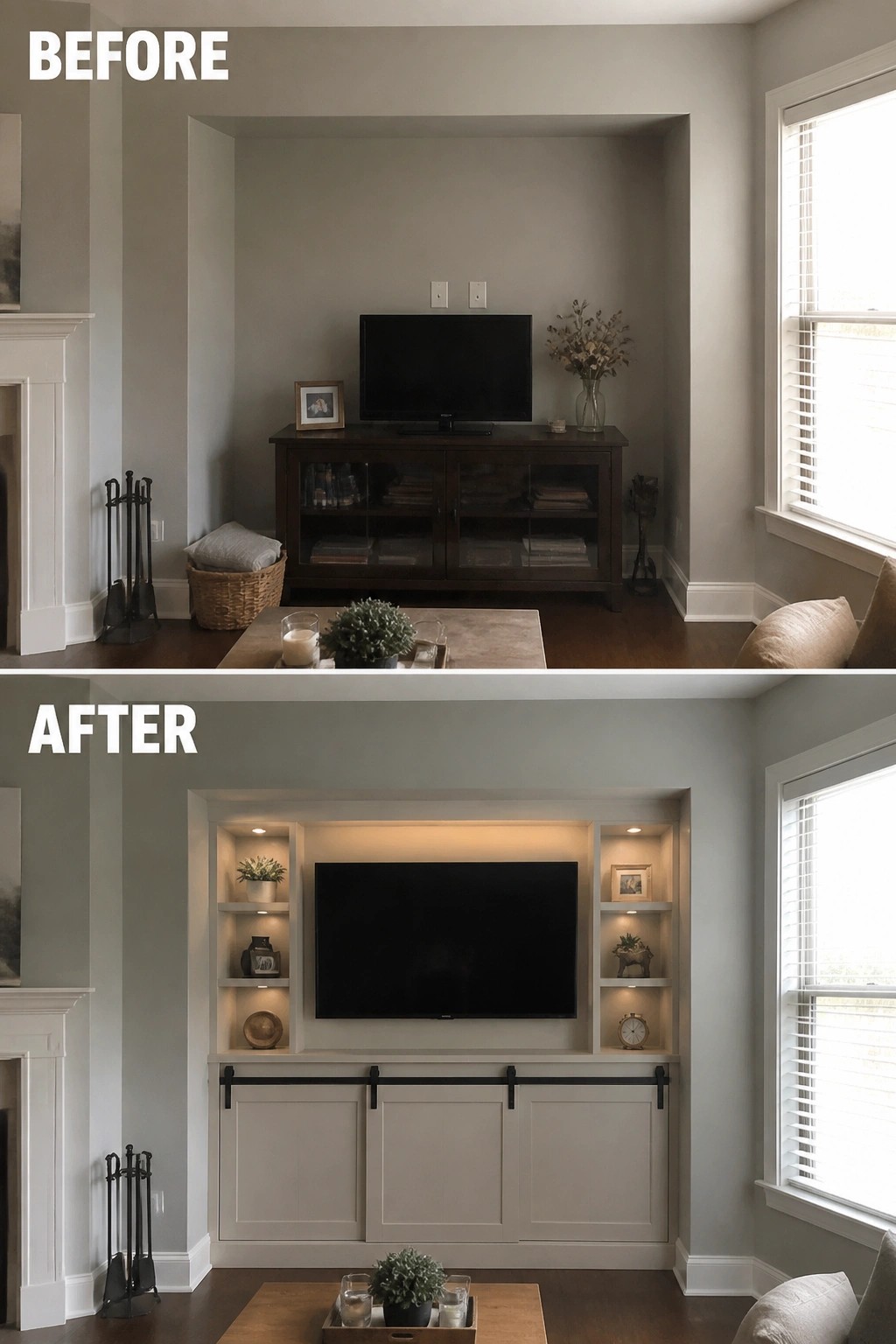
A recessed wall like this one gives the TV a natural place to sit, but a standalone console leaves the area feeling unfinished. Adding shelves on either side and cabinets below turns the whole spot into one connected unit that looks more like part of the room instead of just furniture placed against a wall.
This idea works best in homes with similar alcoves or flat stretches where the TV needs more weight. Measure the space first, then decide how much open shelving you actually want versus closed storage. Simple lighting inside the shelves helps the area feel used without needing extra lamps.
Frequently Asked Questions
Q: Can I place the media wall next to a doorway without it feeling off? A: Leave at least three feet of clearance on the side with the door swing. This keeps traffic flowing smoothly. Measure twice before you frame anything new.
Q: What height works best for mounting the TV in a remodeled living room? A: Mount it so the center sits at eye level when you sit down. That usually means around 40 inches from the floor to the bottom of the screen. Adjust based on your couch height first.
Q: How do I add lighting around the media wall without glare on the screen? A: Use wall sconces on either side instead of overhead spots. Dim them separately from the main lights. Bias lighting behind the TV helps too if you want to reduce eye strain.
